Sitting for more than eight hours a day raises all-cause mortality risk significantly — even among adults who exercise regularly, according to a study in the Annals of Internal Medicine (Biswas et al., 2015). Most of us can't quit our desks. But we can change how we use them.
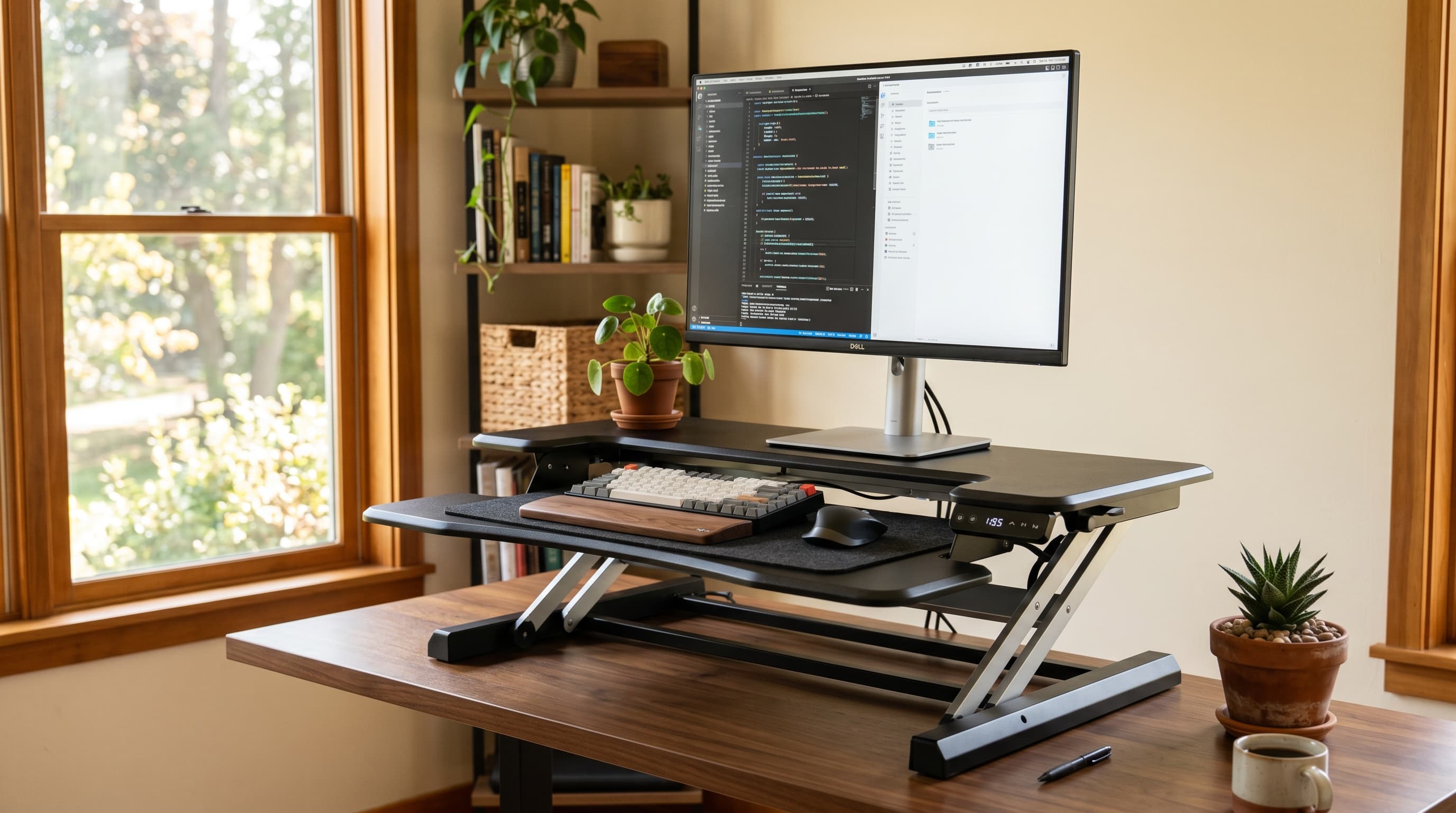
Standing desk converters let you add sit-stand movement to any existing desk without replacing it. They're not perfect. They're a deliberate tradeoff — lower cost and zero desk replacement in exchange for a smaller working surface and slightly more wobble at height. Whether that tradeoff makes sense depends on your situation, and we'll be direct about when it does and doesn't.
These are the five best standing desk converters in 2026, ranked by use case.
TL;DR: Standing desk converters cost $80–$400 vs. $400–$1,500+ for motorized desks. If you're renting, on a tight budget, or want to test sit-stand before committing to a full desk, a converter is a practical entry point. The FlexiSpot AlcoveRiser is the best overall pick for most people.
Are Standing Desk Converters Worth It?
Research on sit-stand benefits is clear: alternating between sitting and standing reduces fatigue and improves output. A Texas A&M study (Hedge & Ray, 2014) found call center workers using sit-stand setups were 45% more productive than colleagues in traditional seated workstations. Converters deliver this same benefit at a fraction of the cost of a motorized desk.
The honest answer is that converters are a compromise — and that's not necessarily a problem. Here's when the compromise makes clear sense:
- You're renting and don't want to haul a 70-lb motorized desk when you move
- You're testing sit-stand before spending $600+ on a full motorized desk
- Your budget is under $300 and a quality full desk isn't feasible right now
- You love your current desk and don't want to replace it
Converters don't make sense if you need a large working surface, frequently adjust height throughout the day, or share a desk with someone at a different height. In those cases, a full motorized standing desk is worth the investment.
The Mayo Clinic recommends alternating sitting and standing every 30–60 minutes. Converters make that habit practical without leaving your workstation — which matters more than people expect when you're in the middle of a focused work session.
Citation capsule: A study published in the Annals of Internal Medicine (Biswas et al., 2015) found that sitting more than 8 hours per day raises all-cause mortality risk significantly, even among physically active adults. Sit-stand tools that reduce prolonged sitting time — including desk converters — address this risk pattern directly.
The 5 Best Standing Desk Converters in 2026
Standing desk converter prices range from about $80 for basic Z-lift platforms to $400 for large dual-monitor units. At the $150–$280 mid-range, you get adjustable keyboard trays, smooth spring-assisted lifts, and enough stability for a single large monitor or two smaller screens. The picks below cover every realistic use case.
Overview
| Pick | Best For | Price |
|---|---|---|
| FlexiSpot AlcoveRiser | Best overall | ~$230 |
| Varidesk ProPlus 36 | Dual monitors | ~$395 |
| FlexiSpot M2B | Best budget | ~$130 |
| Fezibo Converter | Small desks | ~$100 |
| Ergotron WorkFit-T | Heavy monitor loads | ~$300 |
1. FlexiSpot AlcoveRiser — Best Overall
The FlexiSpot AlcoveRiser hits the converter sweet spot: a 35-inch wide work surface, a proper keyboard tray that drops the keyboard to a neutral typing position, and a stable scissor-lift mechanism that holds firm at standing height. It adjusts from 4.7 to 19.7 inches — enough range for users from 5'2" to 6'4". At around $230, it's priced right for what it delivers.
The keyboard tray is the feature most budget converters skip and shouldn't. Without a separate keyboard tray, your keyboard sits at the same elevated surface as your monitor — which forces your shoulders up and your wrists into an uncomfortable angle. The AlcoveRiser's tray fixes this, and it's one of the main reasons it beats similarly priced units.
Pros
- Keyboard tray drops to a genuinely neutral typing position
- Stable scissor-lift mechanism — minimal wobble at max height
- 35-inch surface fits a 27-inch monitor comfortably
- Height range covers most adult heights (5'2"–6'4")
- Strong value at ~$230
Cons
- Takes up most of a standard 48-inch desk
- Not ideal for dual 27-inch monitors side by side
- Lift mechanism requires two-hand operation to raise/lower
2. Varidesk ProPlus 36 — Best for Dual Monitors
The Varidesk ProPlus 36 is the standard recommendation for dual-monitor converter setups. Its 36-inch top surface holds two monitors side by side, the spring-lift mechanism is smooth and well-balanced under load, and it supports up to 35 lbs — enough for two 27-inch displays and peripherals. It's the most expensive pick here at $395, but dual-monitor users will struggle to find a better-supported option.
Varidesk's spring mechanism has a noticeably premium feel compared to budget scissor-lift designs. The unit arrives pre-assembled — lift it out of the box and place it on your desk. For users who've wrestled with furniture assembly, that detail is worth something.
One real limitation: the 36-inch footprint is large. It'll cover most of a standard 60-inch desk. If desk space is tight, look elsewhere. If you're running a dual monitor setup, this is the converter to consider.
Pros
- 36-inch surface handles dual monitors side by side
- Smooth, well-balanced spring-lift mechanism
- 35 lb weight capacity — best in category
- Arrives pre-assembled
- Keyboard tray included
Cons
- Expensive at $395
- Large footprint dominates most desks
- Height range (4.5"–17.5") shorter than some competitors
3. FlexiSpot M2B — Best Budget Pick
The FlexiSpot M2B does one thing well: it brings sit-stand movement to any desk for around $130. The Z-lift design is simpler than a scissor-lift, but it's stable enough for a single monitor and everyday keyboard use. Height range is 4.7 to 19.7 inches — the same as the AlcoveRiser, at about half the price.
The tradeoff is the keyboard tray. The M2B includes one, but it's narrower and the attachment mechanism feels less solid than the AlcoveRiser's. If you type aggressively or have a large keyboard with a numpad, you'll notice the difference. For casual typists or laptop users who just need a monitor lift, it's a genuine value.
If you're building a complete workspace from scratch, the home office setup under $500 guide covers how a converter fits into a full budget setup.
Pros
- Strong value at ~$130
- Same height range as pricier FlexiSpot models
- Stable enough for a single monitor setup
- Compact footprint compared to the AlcoveRiser
Cons
- Keyboard tray narrower and less rigid than premium models
- Z-lift feels less premium under heavy use
- Surface width (31 inches) limits monitor size options
4. Fezibo Standing Desk Converter — Best for Small Desks
The Fezibo converter is the only pick here designed with small desks in mind. It fits desks as narrow as 24 inches and its base footprint is among the most compact available. At $80–$120, it's also the most affordable option. Don't expect a full workstation replacement — the top surface fits a single 24-inch monitor comfortably, and that's about it.
The Fezibo suits laptop setups particularly well. If you work from a laptop with an external monitor, the Fezibo gives you the screen-lift height you need without consuming your entire desk. Stability is acceptable at mid-height but starts to flex above 16 inches. Keep your heaviest monitor under 22 lbs and you'll be fine.
Pros
- Fits small desks — base as narrow as 24 inches
- Most affordable pick at $80–$120
- Good for laptop + single-monitor setups
- Lightweight and easy to reposition
Cons
- Surface too small for dual monitors
- Stability degrades above 16 inches of lift
- Keyboard tray not included on all models — check listing
5. Ergotron WorkFit-T — Best for Heavy Monitor Setups
The Ergotron WorkFit-T is the pick for users with heavy monitors — think 32-inch ultrawide or 34-inch curved displays. It supports up to 35 lbs and Ergotron's spring-lift system is engineered for load-bearing reliability in ways that consumer converters aren't. At $280–$320, it's priced close to the Varidesk but handles heavier single-display setups more confidently.
The WorkFit-T doesn't include a keyboard tray by default — that's a separate $50 add-on from Ergotron. Factor that in if you're comparing it to the AlcoveRiser. Ergotron's build quality and 5-year warranty make this the converter we'd recommend if you're running a premium monitor and want the platform to match.
Pros
- 35 lb weight capacity handles large curved monitors
- Ergotron's spring-lift is smooth and load-tested
- 5-year warranty — best on this list
- Compact footprint for a 35 lb-capacity unit
Cons
- Keyboard tray costs $50 extra
- No side-by-side dual monitor setup — single platform only
- Pricier than comparable single-platform converters
What Should You Look for in a Standing Desk Converter?
Most buyers focus on price and miss the specs that actually determine whether a converter works for them. The most common complaint across converter reviews is height range mismatch — buyers who couldn't reach a comfortable standing position because the unit didn't lift high enough for their height. Checking four key specs before buying prevents that problem.
Citation capsule: The Mayo Clinic recommends alternating sitting and standing every 30–60 minutes to reduce the health effects of prolonged sedentary work. For a converter to support this habit, it needs a height range that reaches a true standing position for your height — typically 20 inches of lift minimum for users over 5'8".
Height Range
This is the single most important spec. You need enough lift to reach a standing position where your elbows sit at roughly 90 degrees. For most people between 5'4" and 6'2", that means at least 18–20 inches of adjustable height. Check both the minimum (for seated clearance) and the maximum before buying.
Keyboard Tray
A converter without a separate keyboard tray forces your hands to the same height as your monitor — which is too high for neutral wrist posture. Look for a tray that drops at least 3–5 inches below the work surface. The AlcoveRiser, Varidesk ProPlus, and FlexiSpot M2B all include one. The Ergotron WorkFit-T doesn't — add it to your budget if you go that route.
Pairing a converter with a quality ergonomic chair also matters — how you sit during seated hours is as important as the standing time you add.
Weight Capacity
Most converters are rated for 20–35 lbs. A single 27-inch monitor, keyboard, and mouse typically weighs 12–18 lbs. Two 27-inch monitors push 22–28 lbs with peripherals. If you're running dual screens, verify the unit is rated for at least 30 lbs.
Footprint and Base Size
Converters sit on top of your desk, so the base footprint eats into your working area. Budget models have 28–31 inch bases. Mid-range models like the AlcoveRiser and Varidesk run 35–36 inches. Measure your desk before ordering — especially if your desk is under 55 inches wide.
Stability at Height
No converter is as stable as a quality motorized desk. But there's a meaningful difference between "slightly wobbly" and "unusably wobbly." Scissor-lift and spring-lift designs are more stable than Z-lift or X-lift designs at equivalent prices. If stability matters to you, prioritize scissor-lift or spring-assisted mechanisms.
Converter vs. Full Standing Desk: When to Choose Each
A Texas A&M University study (Hedge & Ray, 2014) found 45% higher productivity among sit-stand workers — but that benefit applies whether you're using a $130 converter or a $900 motorized desk. The productivity case for sitting less doesn't favor one product type. The decision comes down to budget, flexibility, and your setup.
Here's how we actually think about the converter vs. full desk decision. It's not about which is "better" in the abstract — it's about which makes sense given your constraints right now.
Choose a converter if:
- Your budget is under $400 and you already have a decent desk
- You rent and expect to move within the next two years
- You want to test sit-stand before spending $600+ on a motorized desk
- You share a desk where one person doesn't need standing height
- Your desk is in a small space and a full standing desk would look oversized
Choose a full standing desk if:
- You sit 7+ hours daily and sit-stand is a long-term health priority
- You need a large working surface (60-inch+ desktops)
- You share a desk with someone at a significantly different height
- You have specific height requirements (very tall or short) that converters can't reach
- You want the cleanest aesthetic without a platform sitting on top of your desk
If you're still undecided, start with a mid-range converter like the FlexiSpot AlcoveRiser. You'll know within 30 days whether sit-stand works for your routine. If it does, upgrading to a full motorized standing desk is a well-informed investment. If it doesn't, you're out $230 instead of $700.
A solid ergonomic chair matters regardless of which route you go — reducing sitting time helps, but how you sit when you're seated matters just as much.
The Bottom Line
Standing desk converters are a practical, honest tradeoff. They won't replicate the experience of a purpose-built motorized desk. But at $80–$400, they bring real sit-stand benefits to your existing setup without replacing the desk you already own.
For most people, the FlexiSpot AlcoveRiser is the right starting point — stable, well-sized, keyboard tray included, and priced where it should be. Dual-monitor users should look at the Varidesk ProPlus 36. Heavy-monitor users get the most from the Ergotron WorkFit-T. And if you're budget-constrained, the FlexiSpot M2B delivers the core benefit for $130.
Start small, build the habit, and upgrade when the data from your own experience tells you to. That's a more reliable approach than trying to optimize on specs alone before you've used a sit-stand setup at all.
For the full picture on outfitting a productive workspace, the home office setup under $500 guide covers desk, chair, monitor, and lighting in priority order.