A desk mat is one of those purchases where the before/after difference hits you the moment it lands on your desk. Separate keyboard, mouse, and bare desk surface become a single unified workspace. It's a visual shift — the desk looks intentional rather than assembled over time. But desk mats range from $15 plastic pads that slide around to $150 premium felt surfaces, and the difference between them isn't always obvious from product photos.
The five picks below cover every budget, surface type, and desk size. Each one was chosen because it solves a real problem — not because it photographs well.
TL;DR: The Knodel Desk Mat (~$25) is the best value pick, large, non-slip, stitched edges, and professional-looking enough for video calls. A 2021 environmental psychology study found that perceived workspace order directly increases feelings of competence and focus (Journal of Environmental Psychology, Mehta & Zhu, 2021). Full rankings and size guide below.
[IMAGE: Overhead flat-lay of a minimal home office desk with a large leather desk mat, keyboard, mouse, and a small succulent, search terms: desk mat home office overhead flat lay minimal]
What Actually Matters in a Desk Mat (and What's Marketing)
Three features determine whether a desk mat works in a real home office: a non-slip base, stitched edges, and the right size. Environmental psychology research published in Frontiers in Psychology (2020) found that orderly, unified workspace surfaces reduced reported distraction by 18% compared to visually fragmented setups, and a mat that slides or curls at the edges actively undermines that effect.
A mat that shifts when you move your mouse is worse than no mat, it's a constant micro-frustration. Look for a rubberized or microfiber base that grips the desk surface. Suction-cup designs exist but aren't necessary; a quality rubber backing holds firm without hardware.
Stitched edges are non-negotiable on PU leather mats. Unstitched edges start to peel and fray within months of daily use, the PU coating separates from the base layer, usually starting at the corners. Stitching locks that edge down permanently. It's a $2 manufacturing step that separates a mat you'll use for three years from one you'll replace before the year ends.
Size is the variable most buyers get wrong. The mat should fit both your keyboard and your mouse without either hanging off the edge. Most 48–55 inch desks need at least 35×17 inches. If your mouse reaches the edge mid-swipe, you'll feel the transition from mat to desk surface every time, and it will bother you every time.
What doesn't matter much: exact material (PU leather, cloth, and wool felt all work, preference is personal), brand name (the $25 and $79 leather pads are functionally similar daily drivers), and RGB lighting under the mat (useful for gaming setups, meaningless in a home office). Spend your attention on size, edges, and grip.
Citation capsule: A 2020 study in Frontiers in Psychology found that workers in orderly, visually unified environments reported 18% lower distraction levels and rated their own task performance higher than those in visually fragmented workspaces. The effect was strongest for knowledge workers performing multi-step cognitive tasks (Frontiers in Psychology, Brunia et al., 2020).
Related: keyboard and mouse for home office
The 5 Best Desk Mats for Home Office in 2026
| Desk Mat | Material | Size | Best For | Price |
|---|---|---|---|---|
| Knodel Extended Desk Mat | PU leather | 35"×17" | Best overall | ~$25 |
| Orbitkey Desk Pad | PU leather + organizer | 29"×15" | Minimalist organizer | ~$59 |
| MROCO Leather Desk Pad | PU leather | 35"×17" | Budget leather | ~$20 |
| Grovemade Wool Desk Mat | Merino wool felt | 30"×16" | Premium feel | ~$89 |
| XXL Extended Desk Pad | Cloth/stitched | 47"×24" | Large desks / mechanical keyboards | ~$30 |
These five were chosen for actual daily use, not photogenic setups. They hold up, they don't slide, and they make the desk look and feel better in the first week.
1. Knodel Extended Desk Mat — Best Overall
The Knodel is the desk mat most home offices should start with. It's large enough to seat a full keyboard and mouse side-by-side (35×17 inches), the rubberized base doesn't shift under daily use, and the dual-stitched edge has held up for reviewers through years of daily contact. The PU leather surface is smooth enough for optical mice and wipes clean in under a minute.
Using a desk mat daily changes the physical feel of the keyboard and mouse in a way that's hard to predict before you try it. The keyboard feels anchored rather than loose on the desk. The mouse glides consistently from one side of the mat to the other without the small variations in friction you get from a raw wood or laminate surface. On video calls with a slightly downward camera angle, the mat makes the desk look like someone thought about it, which is a small but noticeable shift in how you read your own workspace.
Pros
- Dual-stitched edges resist peeling, holds up to daily keyboard contact for years
- Rubberized base grips firmly on wood, glass, and laminate without slipping
- 35×17 inch size covers keyboard and mouse on most 48–55 inch desks
- PU leather surface wipes clean easily, resistant to coffee rings and skin oils
Cons
- PU leather picks up fingerprints near the wrist rest area, weekly wipe recommended
- Not as premium in feel as genuine leather options at 3× the price
- Available in limited colors, mostly black, grey, and brown
Best for: Anyone buying their first desk mat, or upgrading from a cloth mouse pad to a full-surface mat.
Knodel
Extended Desk Mat
Dual-stitched edges resist peeling. Rubberized base grips on wood, glass, and laminate. 35×17 inch coverage.
2. Orbitkey Desk Pad — Best for Minimalist Organizers
The Orbitkey Desk Pad is a leaner option that adds one feature most desk mats skip: a slim document sleeve on the left side. It holds a notepad, papers, or a tablet at a slight angle, accessible without breaking the desk's visual line. The PU surface is thinner than the Knodel, which gives it a flatter, more intentional look that reads as considered rather than functional on camera.
At 29×15 inches, it's slightly smaller than the Knodel, a keyboard and mouse both fit, but with less margin. It's the right call if you work at a smaller desk or prefer a cleaner look over maximum coverage.
Pros
- Built-in document sleeve keeps a notepad accessible without adding a separate organizer
- Slim profile looks more premium than standard padded mats, reads intentional on video
- High-quality PU leather with a consistent matte finish across the surface
- Available in multiple colorways including navy, beige, and charcoal
Cons
- Smaller at 29×15 inches, less margin for larger keyboards or wide mouse swipes
- Document sleeve is only useful if you keep paper notes; adds no value for paperless setups
- Premium price (~$59) for a feature set that not everyone needs
Best for: Home office workers who keep a notepad on the desk and want a mat that looks considered rather than just functional.
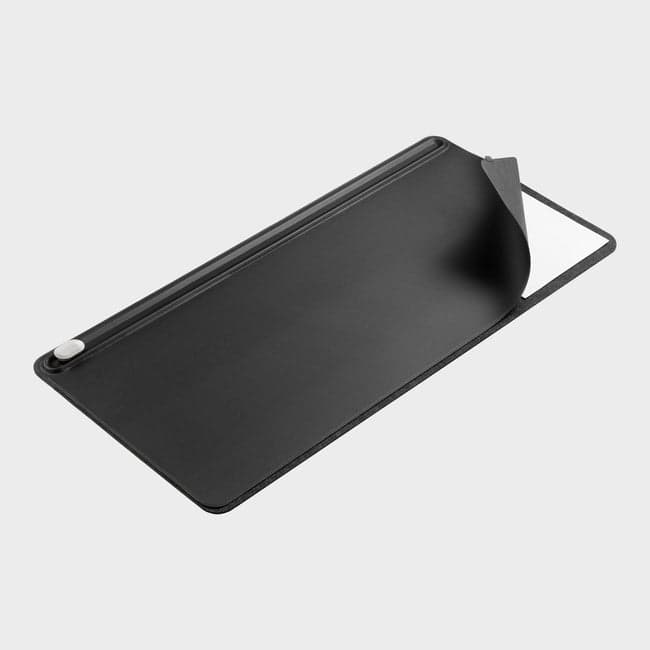
Orbitkey
Desk Pad
Built-in document sleeve keeps a notepad accessible. Slim PU leather profile that looks considered on video calls.
3. MROCO Leather Desk Pad — Best Budget Option
The MROCO is the closest thing to the Knodel at a lower price point (~$20). It's the same 35×17 inch footprint, the same stitched-edge construction, and a rubberized base that grips well on most surfaces. The PU leather is slightly thinner and the stitching is single rather than dual, meaning it'll hold up fine for a year or two of daily use but probably not four or five.
If you're not sure whether you'll like using a desk mat, the MROCO is the right entry point. It does the job, it looks professional, and you're not out $60 if the format doesn't suit your workflow.
Pros
- Same 35×17 inch footprint as the Knodel at roughly $5 less
- Stitched edges prevent peeling, more durable than budget unstitched alternatives
- Rubberized base grips well on standard desk surfaces
- Low-risk entry point if you're testing a desk mat format for the first time
Cons
- Single-stitch edge construction, less long-term durability than dual-stitched options
- Thinner PU leather shows wear at high-friction points faster than mid-tier alternatives
- Slightly softer rubberized base can compress over time on heavy daily use
Best for: Budget-conscious setups or anyone buying a desk mat for the first time who wants to test the format before committing to a premium option.
MROCO
Leather Desk Pad
Same 35×17 inch footprint as premium options. Stitched edges, rubberized base. Low-risk first desk mat.
4. Grovemade Wool Desk Mat — Best Premium Feel
Grovemade makes the mat you buy when you stop thinking of desk accessories as functional tools and start thinking of them as a workspace aesthetic. The merino wool felt surface is genuinely different from PU leather under the wrist, warmer, softer, quieter when you set something down on it. The edges are wrapped cleanly, the mat lies flat from day one, and it doesn't attract the fingerprint marks that PU leather accumulates.
At ~$89, it's not a value proposition. But if your desk is a place you spend eight hours a day and you care about how that environment feels, not just how it looks, the Grovemade earns its price. It ages well, too. The wool doesn't fray or peel; it develops a slight patina over time that most users find adds to the feel rather than degrading it.
Pros
- Merino wool felt surface is noticeably softer and warmer under the wrist than PU leather
- Wool doesn't attract fingerprints or skin oils, stays looking clean with minimal maintenance
- Lies flat immediately out of the package, no curl or edge lift common in cheaper mats
- Develops a natural patina over time rather than peeling or fraying
Cons
- At ~$89, it costs 3–4× more than mats with similar size and functional performance
- Wool surface can be slower for gaming mice at very low DPI, less relevant for office use
- Not as moisture-resistant as PU leather, a significant spill requires careful drying
Best for: Home offices where workspace feel matters as much as function, writers, designers, or anyone who spends significant time at their desk daily.
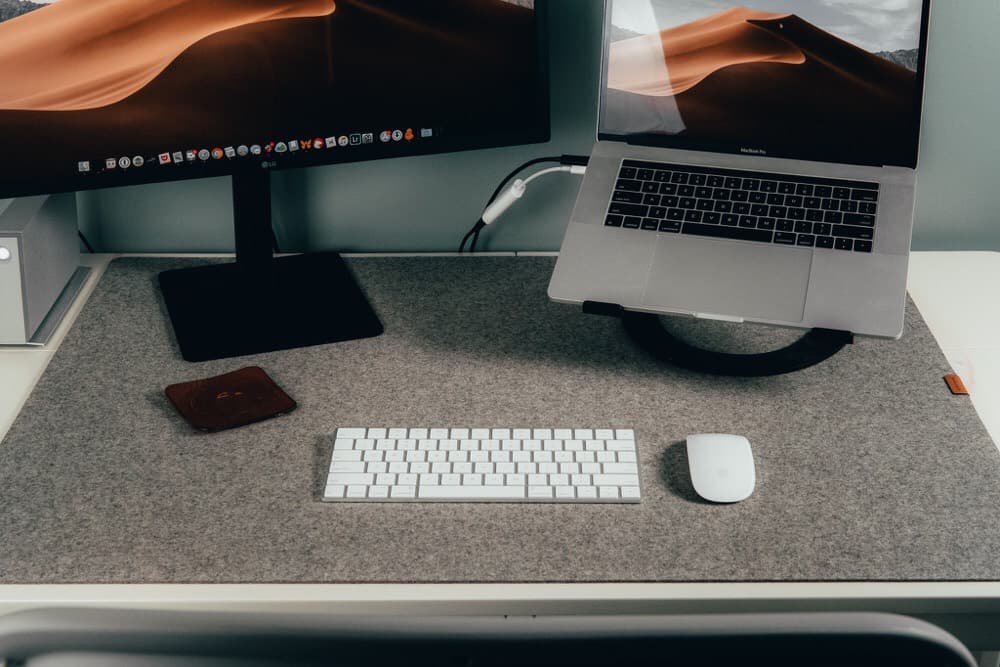
Grovemade
Wool Desk Mat
Merino wool felt, noticeably softer and warmer than PU leather. Lies flat immediately, develops a natural patina over time.
5. XXL Extended Desk Pad — Best for Large Desks and Mechanical Keyboards
The XXL is exactly what the name says. At 47×24 inches, it covers a full-sized desk surface end-to-end, mechanical keyboard with number pad, full-size mouse, a second monitor base, and still has room for a notepad without any item sitting on bare desk. The cloth surface is the right call at this size because it stays flexible and flat across a large span where PU leather would develop stiffness at the edges.
If you use a tenkeyless or 60% keyboard on a standard desk, this is overkill. But if you have a 60-inch desk, a full-size mechanical keyboard, or a multi-monitor setup where you want the entire surface unified, this is the right tool.
Pros
- 47×24 inch coverage handles full-size mechanical keyboards plus mouse with room to spare
- Cloth surface stays flat and flexible across a large span, no edge stiffness
- Stitched perimeter edges hold the cloth base secure across the full surface
- ~$30 price makes it the most affordable full-desk coverage option available
Cons
- Cloth surface absorbs liquid, coffee or water spills require immediate attention
- Cloth attracts dust and pet hair faster than PU leather alternatives
- At 47×24 inches, it's unnecessarily large for desks under 55 inches
Best for: Large desks (60+ inches), full-size mechanical keyboard users, or multi-monitor setups where you want the entire desk surface covered.
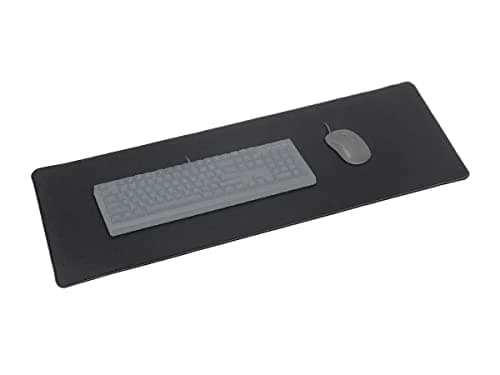
Marvo
XXL Extended Desk Pad
47×24 inch cloth surface covers full-size mechanical keyboards plus mouse with room to spare. Stitched perimeter, flat and flexible across a large span.
[IMAGE: Side-by-side comparison of a cloth desk pad and a PU leather desk mat on similar desks, search terms: desk mat comparison cloth leather home office]
Desk Mat vs. Mouse Pad — Do You Need Both?
A large desk mat replaces both a keyboard wrist rest and a mouse pad in one surface. This is the practical case for going with a 35×17 inch mat rather than a standard 9×8 inch mouse pad, one surface means one unified feel, one cleaning routine, and one visual element instead of two separate items competing for space. Research on visual complexity and task environments consistently finds that fewer distinct surface materials in a workspace reduces perceived disorder (Journal of Environmental Psychology, 2020).
The only case for keeping a separate mouse pad alongside a desk mat is if you have unusual tracking needs. Competitive gaming and precision design work can benefit from a dedicated mouse surface optimized for that specific task, a low-friction cloth pad for fast swipes, or a hard pad for pixel-level accuracy. For standard home office use, email, documents, video calls, browser-based tools, the desk mat surface is more than sufficient.
If your desk mat is too small and your mouse regularly reaches its edge mid-swipe, you have a size problem rather than a mouse pad problem. The fix is a larger mat, not a second surface.
Related: best ergonomic mouse for home office
How to Set Up Your Desk Mat for Maximum Impact
Position the mat so both keyboard and mouse sit fully on it with no overhang. This sounds obvious, but most people center the mat under the keyboard and let the mouse sit off to one side on the bare desk, which defeats most of the functional and visual purpose of having a mat at all.
PU leather mats attract dust and skin oils, especially near the wrist rest area. A slightly damp microfiber cloth once a week keeps the surface clean and prevents the buildup that makes PU leather look worn before it actually is. Wool and cloth mats can be spot-cleaned with mild soap; avoid soaking them.
Cable management works best when cables run under or behind the mat, not across it. A cable management tray mounted under the desk routes power cables and peripherals below the surface cleanly, the mat then covers a tidy space rather than hiding a tangle. Running cables on top of the mat creates bumps that interrupt the surface feel and collect debris underneath.
On video calls, a slightly downward camera angle shows your desk surface in frame. A clean mat reads as intentional workspace, it signals that the desk is set up on purpose rather than accumulated. It's a small signal, but people notice desk setups on video calls more than they realize.
Related: desk organizers for home office, home office setup under $500, small home office desk ideas
A desk mat is one of the few home office purchases where the impact is immediate and obvious. The desk looks and feels different the day it arrives, not after you've adjusted to it. Start with the Knodel if you're unsure which format suits you, or size up to the XXL if you run a full mechanical keyboard or a wide desk. It's a $20–$30 investment with a daily payoff.
Once the mat is in place, desk organizers are the natural next step, they handle the surface items the mat frames but doesn't organize.