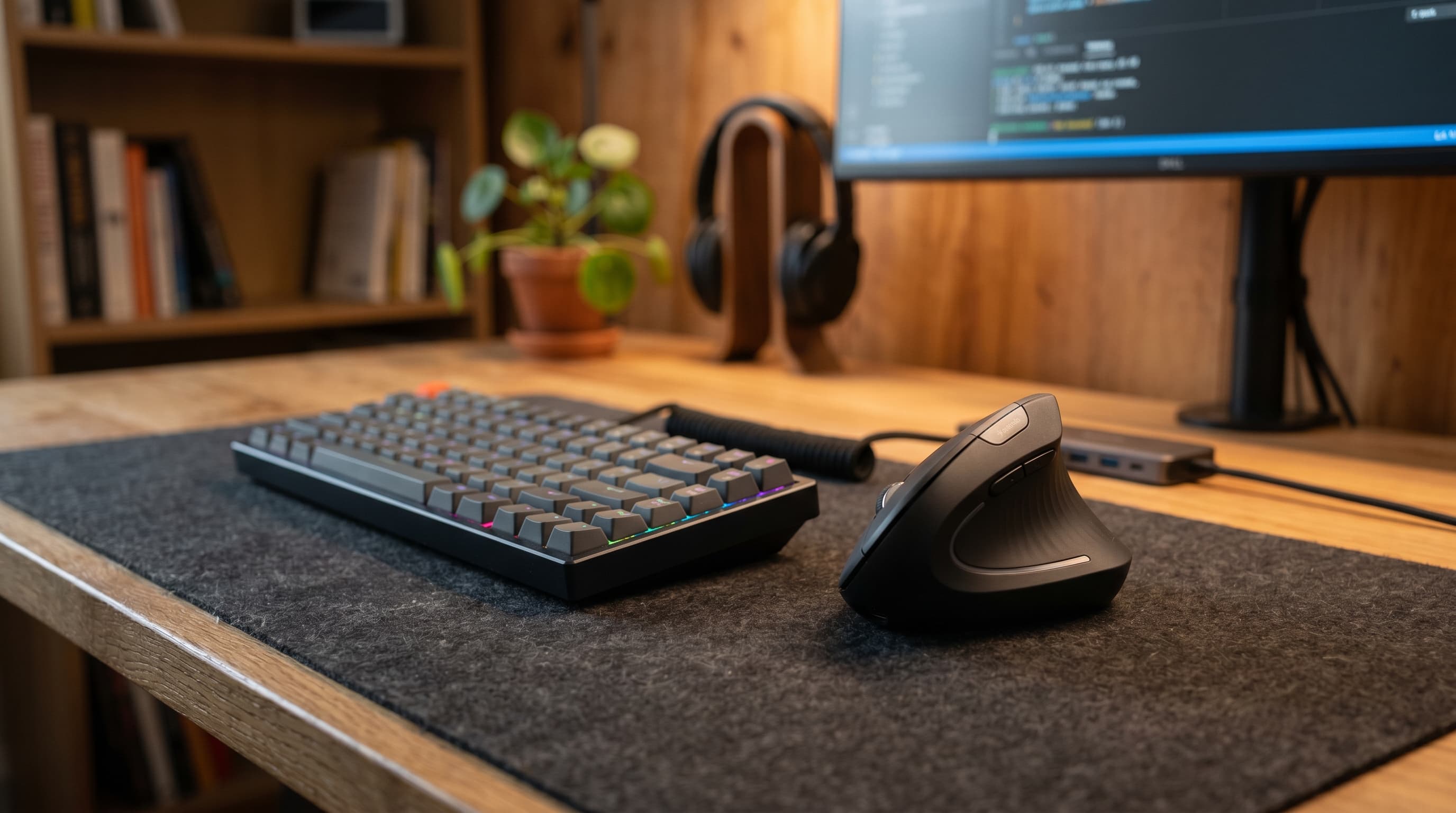
A standard mouse keeps your forearm in full pronation — palm facing the desk — for hours every single day. That sustained rotation compresses the tendons and muscles running through your forearm. Over months it causes real, cumulative pain. Ergonomic mice fix the root cause, not just the symptom, by changing the angle your forearm holds during use.
Repetitive strain injuries account for 33% of all US workplace injury cases (Bureau of Labor Statistics, 2024). The five picks below represent the most effective ergonomic mouse designs currently available: two true vertical mice, one trackball, one sculpted hybrid, and one standard-ergonomic option for people who want better without going fully vertical. Each pick includes an honest adjustment-period estimate.
If you're building out the rest of your home office at the same time, our keyboard and mouse guide covers how the mouse fits into the complete peripheral picture.
TL;DR: The Logitech MX Vertical is the best all-around ergonomic mouse for home office use, 57° handshake angle, wireless, and precise enough for all office tasks. For maximum wrist relief, the Evoluent VerticalMouse 4 goes further. The Kensington Pro Fit Ergo trackball is the right call for users with wrist movement restrictions. Cornell University ergonomics research found vertical mouse designs reduce forearm pronation by up to 58%, directly cutting RSI risk during extended computer use.
Why Do Standard Mice Cause Pain — and What Do Ergonomic Designs Actually Fix?
Cornell University's Human Factors and Ergonomics Research Group found that standard mouse use requires sustained forearm pronation, which increases compressive forces on wrist tendons and correlates with higher carpal tunnel and RSI rates in office workers (Cornell HFES, 2019). Vertical mouse designs reduce this pronation by up to 58%, directly lowering cumulative tendon load during extended computer use.
When your palm faces down, the two bones in your forearm, the radius and ulna, cross over each other. Holding that position requires continuous muscle contraction in your forearm, even when you're not actively moving the mouse. Over a full workday, that's hours of low-level sustained contraction. Over months, it wears on the tendons running through the carpal tunnel.
The fix isn't complicated. Rotate your hand so your thumb points up, the handshake position, and those two bones sit parallel. Your forearm muscles relax. The compressive load on your wrist tendons drops significantly. That's the entire mechanical argument for vertical mice, and it's well-supported by the biomechanics research.
Here's what most buying guides don't tell you: there's a meaningful difference between a "slightly angled" ergonomic mouse and a true vertical design. Many mice marketed as ergonomic, including some popular sculpted shapes, only reduce forearm pronation by 10–20°. True vertical mice reduce it by 50–60°. That difference in angle translates to a real difference in outcome over months of daily use. A marginally tilted standard mouse is not the same thing as a vertical design, and it shouldn't be sold as one.
Citation capsule: Cornell University Human Factors and Ergonomics Research Group found that standard mouse use requires sustained forearm pronation, increasing compressive forces on wrist tendons and correlating with higher carpal tunnel and RSI rates in office workers. Vertical mouse designs reduce this pronation by up to 58%, directly lowering cumulative tendon load during extended computer use (Cornell HFES, 2019).
The 5 Best Ergonomic Mice for Home Office in 2026
The table below compares all five picks at a glance. Each H3 section includes an honest adjustment-period estimate, something most product reviews skip entirely.
| Mouse | Design Type | Hand Size | Wireless | Price |
|---|---|---|---|---|
| Logitech MX Vertical | Vertical (57°) | Medium–Large | Yes | ~$99 |
| Evoluent VerticalMouse 4 | True vertical (90°) | Medium–Large | Wired | ~$89 |
| Kensington Pro Fit Ergo | Trackball | All sizes | Yes | ~$79 |
| Anker Ergonomic Vertical | Budget vertical | Medium | Yes | ~$35 |
| Logitech MX Master 3S | Sculpted standard | Medium–Large | Yes | ~$99 |
Related: best keyboard and mouse for home office
Logitech MX Vertical — Best Overall Ergonomic Mouse
The MX Vertical holds your hand at a 57° angle, close enough to the handshake position to deliver genuine pronation relief, while remaining familiar enough that most users adapt within 3–5 days. It's wireless (Logi Bolt USB receiver and Bluetooth), rechargeable over USB-C, and precise enough for all standard office tasks including spreadsheets and document work.
The first week with the MX Vertical is real. Cursor movement feels slightly sluggish, not because the sensor is worse, but because the motion has shifted from wrist-pivot to forearm-pivot. You're relearning a physical habit. By day four or five, that hesitation disappears. What you notice instead is that your forearm doesn't ache by 3 PM anymore. That's when it clicks, not the mouse, but the trade.
Pros
- 57° handshake angle reduces forearm pronation without full vertical adjustment period
- Wireless via Logi Bolt USB receiver and Bluetooth, pairs to 3 devices
- USB-C rechargeable, 4-month battery life (Logitech specification)
- 4,000 DPI sensor, precise enough for all office and spreadsheet work
Cons
- Right-hand only, no left-hand version available
- 3–5 day adaptation period before precision returns to baseline
- Premium price (~$99) for a vertical design
Best for: Home office workers who want the biggest ergonomic improvement with the shortest adjustment period.
Adjustment period: 3–5 days for general navigation; 1–2 weeks for precision tasks.
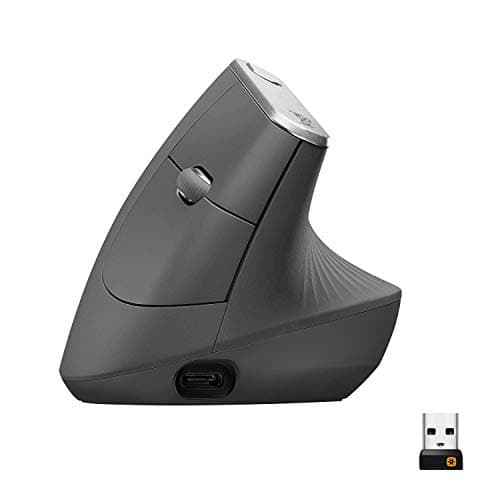
Logitech
MX Vertical
57° handshake angle reduces forearm pronation with the shortest adaptation period of any vertical design, wireless, USB-C rechargeable, 4-month battery life.
Evoluent VerticalMouse 4 — Best for Maximum Wrist Relief
The Evoluent VerticalMouse 4 takes the vertical concept to its logical end: your hand sits at a full 90° angle, completely eliminating forearm pronation. It's the right choice for users who are already experiencing forearm or wrist pain and want the most aggressive ergonomic correction available. The adjustment period is longer than the MX Vertical, plan for 1–2 weeks.
Pros
- Full 90° vertical orientation, eliminates forearm pronation entirely
- Dedicated thumb shelf and sculpted finger rest reduce lateral hand strain
- 800/1200/1800/2800 DPI adjustable via button on top
- Right-hand and left-hand versions both available
Cons
- Wired only, no wireless version of the standard VerticalMouse 4
- 1–2 week adaptation period, longer than any other pick on this list
- Tall profile can feel unstable for users with smaller hands
Best for: Users already experiencing RSI symptoms who want the maximum ergonomic correction available.
Adjustment period: 1–2 weeks; longer for precision-heavy work like graphics or complex spreadsheets.
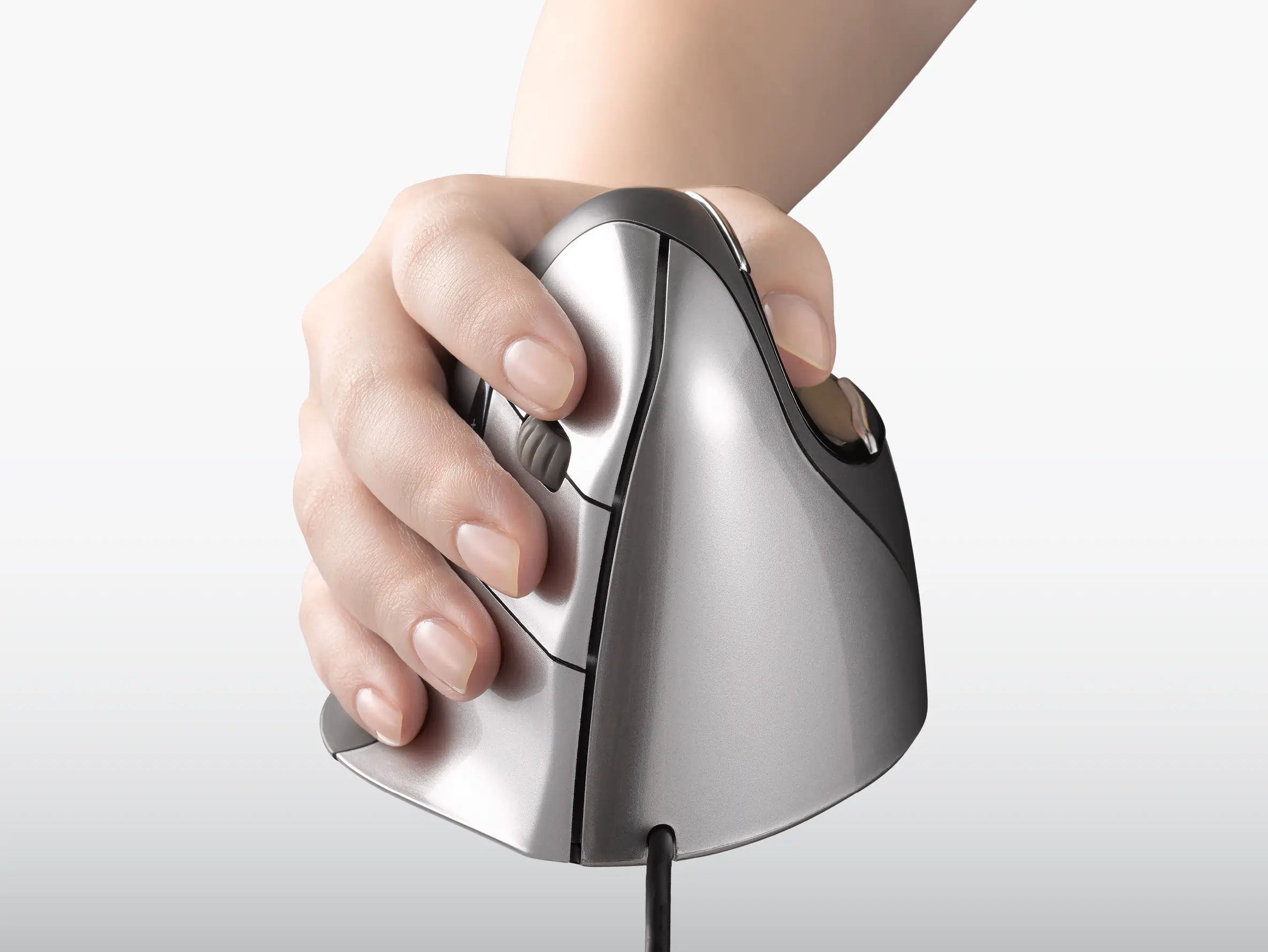
Evoluent
VerticalMouse 4
Full 90° vertical orientation eliminates forearm pronation entirely, dedicated thumb shelf, right and left-hand versions both available.
Kensington Pro Fit Ergo Vertical Trackball — Best for Wrist Movement Restrictions
The Kensington Pro Fit Ergo is a trackball: your hand stays stationary while your thumb moves the ball to control the cursor. That design eliminates wrist movement entirely, which is a different ergonomic benefit from what vertical mice provide. If your pain comes from repetitive wrist movement rather than forearm pronation, a trackball addresses the root cause more directly.
Pros
- Thumb-operated trackball eliminates wrist movement, hand stays completely still
- Wireless 2.4GHz USB receiver, no lag, works on any surface
- Works for all hand sizes, the stationary design removes grip-size sensitivity
- Scroll ring around the trackball replaces a traditional scroll wheel ergonomically
Cons
- Steeper learning curve than vertical mice, cursor control via thumb takes 1–2 weeks
- Trackball requires periodic cleaning as lint accumulates under the ball
- Not ideal for graphics or fine precision work during the adaptation period
Best for: Users with wrist movement restrictions, limited desk space, or pain that originates from repetitive wrist travel rather than pronation.
Adjustment period: 1–2 weeks; thumb cursor control feels unfamiliar before it becomes second nature.
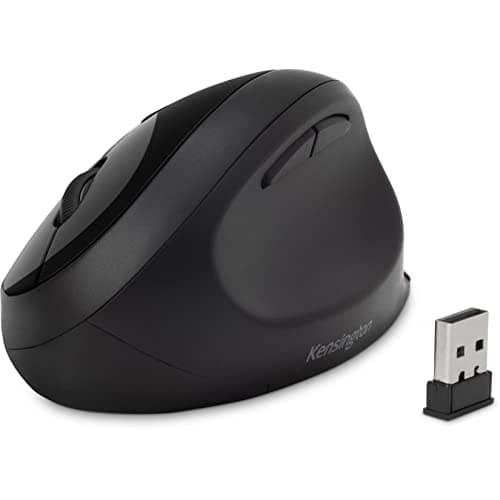
Kensington
Pro Fit Ergo Vertical Trackball
Thumb-operated trackball keeps your hand completely stationary, eliminates wrist movement rather than pronation, wireless 2.4GHz USB receiver.
Anker Ergonomic Vertical Mouse — Best Budget Vertical
The Anker vertical mouse delivers the core ergonomic benefit, a handshake-position grip that eliminates forearm pronation, at roughly a third the price of the Logitech MX Vertical. It's wireless (2.4GHz USB receiver), offers three DPI settings (800/1200/1600), and fits medium-sized right hands well. It's the right entry point for anyone who wants to try vertical mouse ergonomics before committing to a premium price.
Pros
- Vertical handshake orientation at ~$35, best price-to-ergonomic-benefit ratio on this list
- 2.4GHz wireless USB receiver, lag-free for all office tasks
- Three DPI settings (800/1200/1600) accessible via button
- Rechargeable via USB, no AA batteries
Cons
- Right-hand only, medium hand size, not suitable for large hands
- No multi-device pairing, single USB receiver only
- Build quality noticeably below the premium picks; scroll wheel has less tactile precision
Best for: Budget-conscious users testing vertical ergonomics for the first time, or as a second mouse for a shared workspace.
Adjustment period: 3–5 days, same timeline as the MX Vertical at the same grip angle.
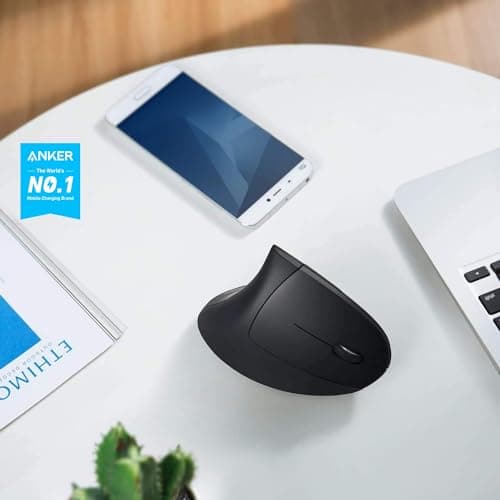
Anker
Ergonomic Vertical Mouse
Handshake-position vertical grip at budget price, 2.4GHz wireless, three DPI settings, the lowest-risk way to try vertical mouse ergonomics.
Logitech MX Master 3S — Best Sculpted Standard Ergonomic
The MX Master 3S isn't a vertical mouse. It's the best choice for users who want a meaningful ergonomic upgrade over a flat standard mouse without any adaptation period. The sculpted right-hand shape, dedicated thumb rest, and slightly tilted body reduce pronation by roughly 15–20° compared to a flat mouse, not as effective as a true vertical, but far better than nothing. The quiet-click mechanism and MagSpeed scroll wheel make it the most refined office mouse at this price.
Pros
- No adaptation period, feels natural immediately, unlike vertical designs
- Quiet-click mechanism appropriate for call environments and shared spaces
- MagSpeed electromagnetic scroll wheel scrolls 1,000 lines in under 1 second (Logitech spec)
- Multi-device pairing to 3 devices via Logi Bolt or Bluetooth
Cons
- Only 15–20° pronation reduction, significantly less than true vertical designs
- Right-hand only, large size, not suited for small hands or fingertip grip
- Premium price (~$99) for a mouse that's ergonomic but not truly vertical
Best for: Users who want better ergonomics without any learning curve, or who do precision work (graphics, video editing) where a full vertical adaptation period isn't practical right now.
Adjustment period: None, the sculpted shape feels natural from day one.
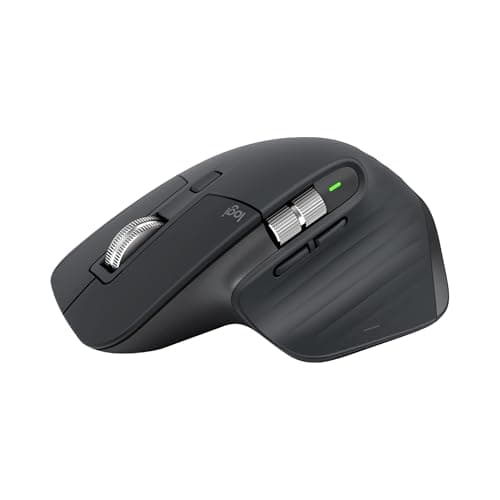
Logitech
MX Master 3S
Sculpted right-hand shape with quiet-click mechanism and MagSpeed scroll wheel, ergonomic upgrade over flat mice with zero adaptation period.
Vertical Mouse vs. Trackball vs. Standard Ergonomic — Which Should You Choose?
The right ergonomic mouse depends less on brand preference and more on where your pain is coming from. These three design categories fix different problems. Matching the design to your specific issue is what makes ergonomic equipment worth it, buying the wrong type won't help much, even if it's technically "ergonomic."
If your pain is in your forearm or from pronation: A vertical mouse is the direct fix. The Logitech MX Vertical (57°) is the shortest path to relief with the lowest adjustment cost. If symptoms are already significant, the Evoluent VerticalMouse 4 (90°) eliminates pronation entirely and is worth the longer adaptation.
If your pain comes from repetitive wrist movement: A trackball wins here. The Kensington Pro Fit Ergo keeps your hand completely stationary, wrists don't travel at all. This is particularly effective for users whose pain comes from moving the mouse across large monitors all day, or for anyone with a small desk where large mouse movements aren't practical.
If you want ergonomic gains with zero adjustment period: The MX Master 3S is the answer. It's not a vertical mouse, but it's substantially better than a flat standard mouse. For users doing precision-heavy work, photo editing, detailed spreadsheets, CAD, the standard ergonomic shape lets you maintain full cursor control without the 1–2 week adaptation dip that true vertical designs require.
Use case quick reference:
- Forearm/pronation pain → Logitech MX Vertical or Evoluent VerticalMouse 4
- Wrist movement pain or limited desk space → Kensington Pro Fit Ergo trackball
- No adjustment period, precision work → Logitech MX Master 3S
- Budget, testing vertical ergonomics first → Anker Ergonomic Vertical
- Already have RSI symptoms, want maximum correction → Evoluent VerticalMouse 4
Related: best ergonomic chairs under $300
How Do You Set Up an Ergonomic Mouse Correctly?
Most ergonomic mice fail in practice not because the mouse is wrong, but because the desk and chair height are wrong. Cornell University ergonomics guidelines specify that the mouse should sit at elbow height when your upper arm hangs naturally at your side, roughly the same height as your keyboard (Cornell HFES, 2019). If your chair is too low or your desk is too high, even the best vertical mouse won't fully resolve forearm strain.
Mouse position: Place the mouse directly beside your keyboard, as close to your body's centerline as possible. Reaching forward or to the side to use the mouse creates shoulder extension that compounds over hours. A tenkeyless keyboard (without the numpad) helps here, it keeps the mouse closer to center.
Arm angle: Your elbow should be at roughly 90–110° when your hand rests on the mouse. A sharper angle (less than 90°) compresses the ulnar nerve at the elbow. A wider angle requires shoulder elevation to reach the mouse. Get your chair height right before evaluating the mouse, the mouse is the last variable, not the first.
DPI settings: Start at 1000 DPI and adjust from there. Higher DPI (2400+) reduces physical hand movement but makes precise clicks harder. Lower DPI (400–600) forces larger arm movements, which can shift strain to your shoulder and elbow. Most ergonomic mice let you adjust DPI with a dedicated button. Find the setting where you can click targets accurately without large arm movements or twitchy over-correction.
The chair underneath you determines arm angle. If you haven't sorted that yet, our ergonomic chairs under $300 guide covers the seat height and lumbar support variables that make the mouse position math work. For the keyboard side of the same equation, our keyboard and mouse guide walks through how keyboard height and tilt interact with mouse positioning. And if you're building a full setup rather than just upgrading one piece, the home office setup under $500 guide covers the priority order across every category.
If ergonomics are one of your core productivity inputs, which the RSI numbers suggest they should be, our work from home productivity tips covers the broader system that surrounds your equipment choices.
Related: best ergonomic chairs under $300, best keyboard and mouse for home office
For most home office workers, the Logitech MX Vertical is the right starting point. It's wireless, precise enough for all office tasks, and the 57° angle delivers real pronation relief with a shorter adaptation period than a true vertical design. Most users notice reduced forearm fatigue within the first week, before full precision even returns.
If you're already experiencing forearm pain, the Evoluent VerticalMouse 4 is worth the stricter learning curve. The full 90° angle eliminates pronation entirely, and two weeks of adjustment is a reasonable trade for months of relief. Either way, the switch pays off faster than most people expect.
The mouse is one half of the peripheral equation. For the keyboard side, and how the two work together for complete wrist health, our keyboard and mouse guide is the natural next read.