A cluttered desk isn't just an aesthetic problem. Princeton Neuroscience Institute researchers, writing in Journal of Neuroscience (2011), found that objects competing in your visual field reduce the brain's ability to maintain focus — every item on your desk that isn't directly related to your current task consumes cognitive resources. The research is clear: clutter is cognitive noise.
The good news is that fixing it is cheap. The desk organizer market is full of overengineered solutions, but most home offices need three things: somewhere for everyday supplies, a solution for cables, and a clear surface for your keyboard and mouse. The seven picks below cover every desk size, budget, and organization style — from a $15 bamboo set to a wall-mounted pegboard that takes clutter off the surface entirely.
TL;DR: Princeton Neuroscience Institute research found visual clutter directly reduces focus and task performance (Journal of Neuroscience, 2011). For most home offices, a bamboo desk organizer ($15–$25) combined with a cable management box ($20–$35) solves 80% of the problem. All seven picks are ranked by use case below.
Why a Cluttered Desk Hurts Your Focus More Than You Think
Princeton Neuroscience Institute researchers found that visual stimuli compete for neural representation in the brain, even when those stimuli aren't what you're focusing on (Journal of Neuroscience, McMains & Kastner, 2011). Every object in your peripheral view that isn't the task at hand makes sustained attention harder. The effect accumulates with desk clutter — more items means more competing stimuli, even if you've learned to ignore them.
The implication most productivity guides miss: you don't need a perfectly minimal desk to get the benefit. You need a desk where everything has a designated spot. Six pens in a pen holder impose far less cognitive load than those same six pens scattered across the surface. Organization reduces visual complexity, not just volume — and that's what the brain actually responds to.
Citation capsule: Princeton Neuroscience Institute researchers found that stimuli outside the focus of attention still compete for neural representation, reducing performance on tasks requiring sustained concentration (Journal of Neuroscience, McMains & Kastner, 2011). On a typical desk, cable tangle is the highest-complexity visual stimulus present — removing it produces the biggest single cognitive benefit of any organizing change.
Cable clutter is the worst offender. Cables are visually complex, irregular in shape, and carry no useful information — they're pure cognitive noise. A cable management box under your monitor removes dozens of competing stimuli in a single move.
The 7 Best Desk Organizers for Home Office in 2026
| Pick | Best For | Price Range |
|---|---|---|
| Bamboo Desk Organizer Set | Most home offices | $15–$25 |
| Desktop Organizer with Drawers | Supply-heavy setups | $25–$45 |
| Monitor Riser with Storage | Limited desk space | $30–$55 |
| Desktop Cable Management Box | Cable clutter | $20–$35 |
| Under-Desk Drawer | Hidden storage, no footprint | $20–$40 |
| Pegboard Wall Organizer | Dedicated office rooms | $35–$60 |
| Letter Tray / File Sorter | Document-heavy setups | $15–$30 |
These picks were chosen for one reason: they work in real home offices, not staged photography. That means they hold up to daily use, don't require a desk redesign, and don't make your workspace look like a prop.
1. Bamboo Desk Organizer Set — Best Overall
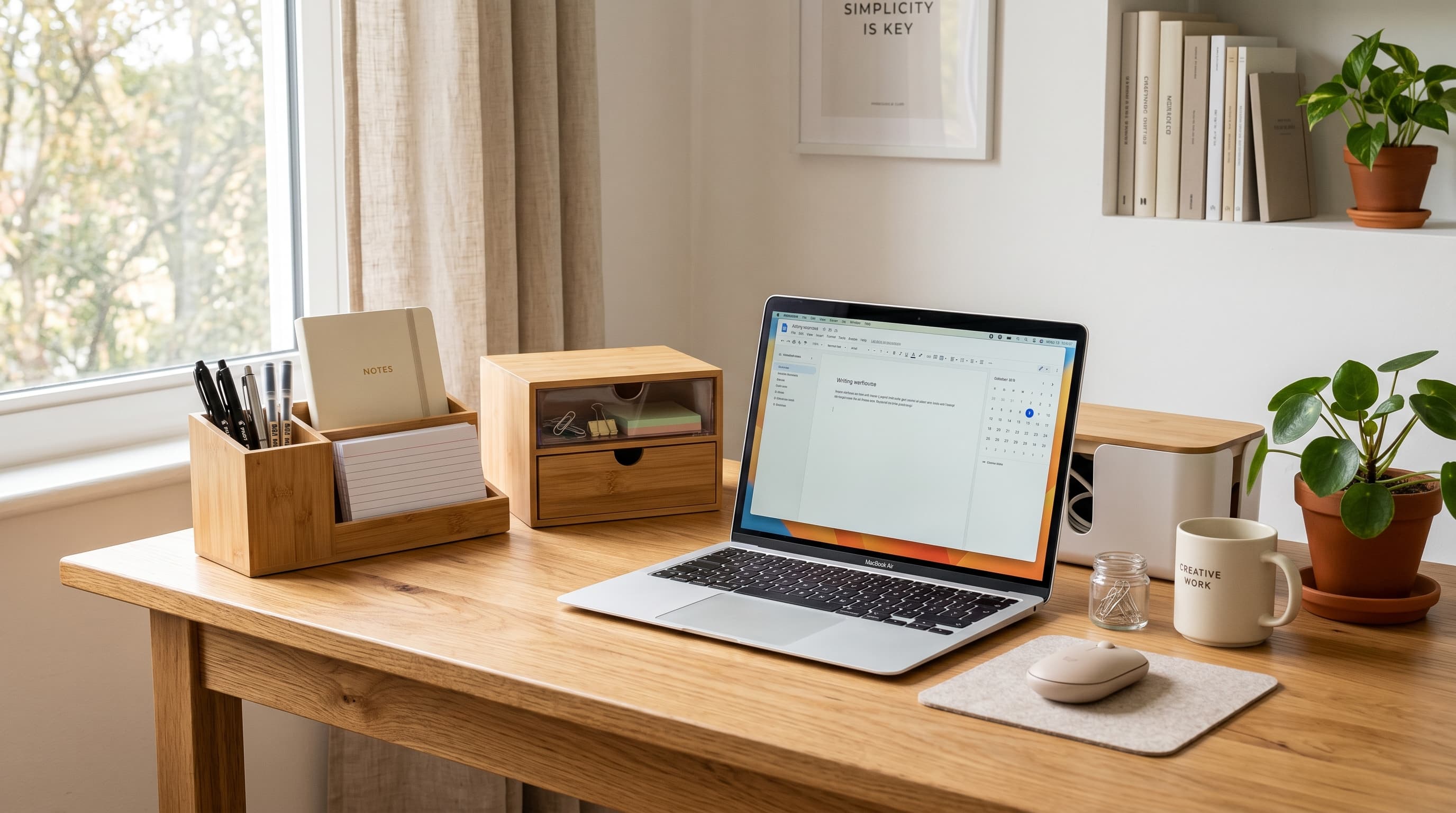
A bamboo organizer with pen holders, a file tray, and small compartments handles the most common source of desk clutter: everyday office items without a home. Bamboo is durable, doesn't slide, and looks intentional on a video call — more professional than plastic at the same price. Most sets run four to six compartments for under $25.
Pros
- Covers pen, paper, and small supply storage in one compact footprint
- Bamboo looks professional on video calls — more considered than plastic alternatives
- Most sets under $25 include enough compartments for a full desk cleanup
- Lightweight and easy to move when cleaning the desk surface
Cons
- Doesn't address cable clutter — needs pairing with a cable management box
- Fixed compartment layout doesn't suit every workflow
- Bamboo can absorb moisture near drinks — wipe down regularly
Best for: Most home offices. If you're buying one organizer, start here.
Shop Bamboo Desk Organizers2. Desktop Organizer with Drawers — Best for Supply-Heavy Setups
A desktop drawer organizer adds concealed storage for items you need daily but don't want visible: paper clips, sticky notes, batteries, and loose cables. The drawer keeps them accessible without adding surface clutter. A two-drawer unit with a flat top doubles as a second desk tier — useful for a phone, small plant, or to-do notepad.
The flat top is the underrated feature. After running a two-drawer unit on my desk for several months, it became the single most-used surface outside the keyboard area — my phone, daily to-do notepad, and water bottle all landed there by the second week and stayed. Those three items previously migrated around the desk constantly, which meant they were always in the wrong spot at the wrong moment.
Pros
- Concealed drawers eliminate visual clutter from daily-use items
- Flat top surface creates a second functional tier without taking more footprint
- Compact footprint — typically under 12 × 9 inches — works on any desk size
- Keeps supplies accessible without making them visible
Cons
- Drawers become junk drawers without a clear decision about what belongs in each one
- Heavier than open organizers — not ideal if you rearrange your desk often
- Most models don't address cable routing
3. Monitor Riser with Storage Drawer — Best for Small Desks
A monitor riser lifts your screen to eye level while adding a storage drawer and open shelf underneath. The open shelf holds a keyboard when you need the full desk surface, or a laptop when working with an external monitor. For desks under 48 inches, this is the highest-value organizer on the list — it creates vertical storage without adding any horizontal footprint.
If you're working with a compact setup, a monitor riser with storage often delivers more value than any other single accessory purchase. The small home office desk guide covers how to make the most of limited surface space.
Pros
- Raises monitor to eye level — ergonomic benefit built in at no extra cost
- Adds drawer and shelf storage without increasing desk footprint
- Open shelf accommodates keyboard tuck, laptop, or small supplies
- Drawer keeps frequently-used small items concealed and close at hand
Cons
- Fixed height — not adjustable like a monitor arm
- Doesn't work if you already use a monitor arm
- Riser plus monitor adds weight to the desk surface — confirm desk load rating
4. Desktop Cable Management Box — Best for Cable Clutter
A cable management box conceals a power strip and all connected cables inside a single container. It eliminates what is typically the most visually complex source of desk clutter: the tangle of cables feeding your monitor, laptop, phone charger, and peripherals. A $25 cable box removes more visual noise than any other organizer on this list, dollar for dollar.
Pair it with velcro cable ties to bundle the cables going in. The combination takes under 20 minutes and is among the highest productivity-per-dollar improvements available in a home office — which is a point that almost never gets made, because cable boxes are boring to write about.
Pros
- Removes cable tangle — the highest-complexity visual clutter source on most desks
- Power strip stays accessible while all cables route through port openings
- Works under the desk or on the surface depending on your layout
- Most boxes accommodate surge protectors and 6–8 cables
Cons
- Fixed size — confirm your power strip dimensions fit before buying
- Cables still need to exit cleanly from the box's routing ports
- Not a substitute for under-desk routing on cable runs from wall to desk
For cables running between devices and along the desk edge, the full cable management guide covers under-desk trays, raceways, and routing strategies.
5. Under-Desk Drawer — Best Hidden Storage
An adhesive under-desk drawer mounts to the underside of the desk surface and adds hidden storage without touching the desktop at all. It's the right solution when your desk is already at surface capacity — or when you want specific items (headphone cable, hand cream, USB hub) within arm's reach but invisible. Most mount with adhesive strips, hold three to five pounds, and install in under five minutes.
Pros
- Adds storage without any footprint on the desk surface
- Keeps items accessible while completely hidden from view
- Adhesive mount installs in minutes with no drilling
- Ideal for desks where surface space is fully committed
Cons
- Weight limit is low — typically 3–5 lbs, not suitable for heavy items
- Adhesive mount may not bond to all desk underside finishes
- Shallow depth limits contents — nothing taller than about 2 inches fits well
6. Pegboard Wall Organizer — Best for Dedicated Office Rooms
A pegboard system mounted above the desk moves accessories off the surface entirely. Headphones, small plants, notebooks, pens, sticky note pads — all migrate to hooks and shelves on the wall. It's the most significant organizational change on this list and the most visually dramatic. It works best in a dedicated office room where the desk doesn't move.
Pegboards have one underrated advantage over every other organizer: they're infinitely reconfigurable at zero cost. Hooks and shelves rearrange in seconds as your workflow changes — no other desk organizer offers that. The constraint is that your desk needs to stay in the same position relative to the wall, which makes pegboards a poor fit for flexible or shared workspaces.
Pros
- Moves the most items off the desk surface of any solution on this list
- Hooks and shelves are fully reconfigurable as needs change — no new parts required
- Visual display of organized items looks intentional and designed
- Can incorporate headphone hook, plant shelf, and sticky note section in one install
Cons
- Requires wall mounting — not practical for all renters
- Works best when desk position is fixed
- Initial setup takes 30–60 minutes versus minutes for surface organizers
7. Letter Tray / File Sorter — Best for Document-Heavy Setups
A stackable letter tray is the right solution when paper is the primary clutter source. Invoices, printed briefs, reference sheets, and incoming mail pile up fast on a desk that has no dedicated landing zone for them. A two- or three-tier letter tray gives each category a slot — inbox, active work, to-file — so paper moves through the desk rather than accumulating on it.
It's the least glamorous pick on this list, but for anyone who handles physical documents regularly, it eliminates the biggest single source of surface clutter. A desk tidy full of pens doesn't help if the real mess is a stack of paper that spreads across three square feet.
Pros
- Gives paper a permanent landing zone — the single most effective fix for document clutter
- Stackable tiers let you sort by priority or category without extra footprint
- Inexpensive — most quality metal or bamboo trays run under $25
- Keeps active documents visible and accessible without spreading across the surface
Cons
- Only useful if you regularly handle physical paper — digital-only workers don't need it
- Trays fill up quickly without a regular filing habit to move paper out
- Adds visual bulk if placed prominently — better positioned at the desk edge or corner
Best for: Home offices that handle physical documents — invoices, printed drafts, contracts, or reference materials used daily.
Shop Letter Tray OrganizersWhat to Remove from Your Desk Before You Organize
Organization fails when people organize everything rather than removing things first. Before adding any organizer, clear the desk entirely and only return what you actually use every day. Here's what typically doesn't belong on a desk:
- Old mail and paperwork that belongs in a filing system, not on a surface
- Cables for devices not at the desk — USB adapters, old chargers, spare cables
- Decorative items that require moving when you need space
- Duplicate supplies — if you have eight pens, keep two
- Anything untouched in the past two weeks
The desk surface should hold: keyboard, mouse, monitor, a notepad, one pen, and one personal item if you want one. That's it. Everything else is storage.
Buy one organizer, use it for two weeks, then reassess. Most people overbuy and end up with the organizers themselves becoming clutter. One well-chosen piece — the right one for your primary problem — solves more than a matched set that doesn't fit the actual workflow.
How to Choose the Right Desk Organizer for Your Setup
The right choice depends on desk size, primary clutter type, and whether you have usable wall space above the desk.
If your desk is under 48 inches: Start with a monitor riser with storage. It creates vertical space and delivers the most value for small desks. Add one cable management box. Skip large organizer sets.
If cables are the main problem: A cable management box plus an under-desk cable tray handles 90% of cable issues. Velcro ties bundle the rest. See the cable management guide for full routing options.
If everyday supplies are scattered: A bamboo organizer or desktop drawer organizer fixes it. Pick one — two organizer units on one desk usually creates more clutter than it solves.
If you have a dedicated room with a fixed desk: A pegboard is worth the 45-minute install. Everything migrates to the wall and the desk becomes a clean working surface.
For a full home office setup from scratch — including desk, chair, monitor, and lighting — the home office setup under $500 guide covers everything in priority order. Organizers are the finishing layer, not the foundation.
The Princeton finding from 2011 remains the most useful thing written about desk organization: visual stimuli compete for neural resources, and clutter is cognitive noise. The practical fix is cheap. A $25 bamboo organizer and a $30 cable management box removes most of the visual competition on a typical desk.
Start with cables. They're the most visually complex clutter source and the fastest to eliminate — a cable box and velcro ties costs under $40 and takes 20 minutes. Add a bamboo organizer for everyday supplies. Those two changes represent the best desk organizers for home office use at the lowest cost and effort: they clear the surface, reduce competing visual stimuli, and make the workspace look like it was set up with intention rather than accumulated over time.