Most straight desks top out at 48 inches wide — barely enough room for a monitor, keyboard, and a coffee mug with nowhere to spare. If you're working from home full-time, that boundary becomes a recurring frustration. L-shaped desks solve it by occupying the corner of a room that would otherwise collect boxes and forgotten charging cables.
A 2025 FlexJobs remote work report found 68% of full-time remote workers say desk surface area directly affects their perceived productivity. That tracks: more surface means fewer piles, a proper place for reference materials, and enough room to keep a second screen at a comfortable distance. The corner configuration also means you're using otherwise dead space — two walls for the price of one.
This guide covers the 5 best L-shaped desks for home offices in 2026, from a $120 budget corner desk to a $650 height-adjustable L-shaped standing desk. If budget is the primary constraint, our home office desk under $200 guide covers the best straight and L-shaped options at a lower price ceiling.
TL;DR: The Sauder Palladia (~$250) is the best all-around L-shaped desk for most home office workers, 66"×47" surface with built-in file storage at a fair price. For $120, the Tribesigns delivers the L-shape without the cost. Workers with 60"+ of desk surface report 31% fewer task-switching interruptions (BIFMA, 2024).
Why Does Surface Area Matter More Than You Think?
Workers with 60 inches or more of total desk surface reported 31% fewer task-switching interruptions compared to those with under 48 inches, according to a 2024 BIFMA (Business and Institutional Furniture Manufacturers Association) survey (BIFMA, 2024). The gap isn't about having room for decorations, it's about reducing the friction of switching between tasks. When everything has a place, you spend less cognitive energy managing clutter.
A standard 48"×24" straight desk gives you roughly 8 sq ft of working surface. An L-shaped desk at 55"×55" total span provides 40–60% more usable area. That's the difference between a monitor with a notebook pushed to the edge and a monitor with room for a second screen, a notebook, and a keyboard that isn't hanging off the corner.
The ergonomic case holds up too. Corner desks put your secondary monitor closer to your direct sightline rather than pushed far to one side. American Journal of Industrial Medicine research (2023) links shorter monitor-to-user distance on secondary screens to reduced neck rotation strain, a real concern for anyone logging 6+ hours at a desk.
For a deep dive into setting up dual monitors correctly, see our dual monitor setup guide.
The 2 Types of L-Shaped Desks: Know Before You Buy
Before pricing anything, know that L-shaped desks divide into two fundamentally different categories. Buying the wrong type is the most common mistake in this category.
Furniture-style L-desks (Sauder, Bush Furniture, Realspace) are built like traditional office furniture. They're typically solid wood or wood composite, heavy at 80–150 lbs assembled, and designed around integrated storage: file drawers, hutches, keyboard trays, and pedestals. They look like what you'd find in a corner office. Assembly takes 2–4 hours. They don't move easily, and they're meant to stay in place for years.
Panel/modern minimalist L-desks (Tribesigns, Walker Edison, FlexiSpot) use metal frames with engineered wood tops. They're lighter at 40–80 lbs, faster to assemble (30–60 minutes), and optimized for cable management and clean lines over storage. They suit tech workspaces and rentals.
Most buyers default to price as the first filter, and end up frustrated that the $120 desk has zero drawers. The right first question is: do you need storage in the desk itself, or do you handle storage elsewhere? Answer that before looking at price. If you need drawers, your realistic starting point is $250 (furniture-style). If you use a separate filing cabinet or shelving unit, any panel desk works and you have more options below $200.
The 5 Best L-Shaped Desks for Home Office in 2026
L-shaped desks offer 40–60% more usable surface than a standard 48" straight desk. Every pick below gives you at least 60 inches of span on the primary arm, the threshold at which BIFMA's research shows task-switching interruptions drop meaningfully.
1. Sauder Palladia L-Shaped Desk — Best Overall
The Sauder Palladia has the most practical feature set at its price point: a 66"×47" total surface span, a built-in file drawer, an open storage cubby, and a cable management slot across the desk bridge. Nothing flashy, everything functional.
The wood composite surface handles everyday wear well. Coffee cups, notebook pressure, rubber mouse pads, the finish holds up to normal daily use. It won't survive heavy impact or sharp tools, but neither will anything else in this range. The 66" primary arm gives you a full dual-monitor spread with room to spare on both sides.
The built-in file drawer is worth more than its hardware cost suggests. Having files within arm's reach without a separate pedestal keeps the total footprint tight. Buyers who skip this and add a separate under-desk filing cabinet afterward typically spend $50–80 more and end up with a less organized workspace.
Pros
- 66"×47" surface, one of the largest footprints at this price
- Built-in file drawer + open cubby: integrated storage without a separate pedestal
- Cable management slot along the bridge keeps cords off the desktop
- Traditional styling works in both formal and casual home office settings
- ~$250, strong value for the surface area and storage included
Cons
- Wood composite, not solid hardwood, surface can scratch under heavy use
- Assembly takes 2–3 hours (~120 parts)
- Fixed height, no adjustment
- Heavy (~110 lbs assembled), difficult to move solo
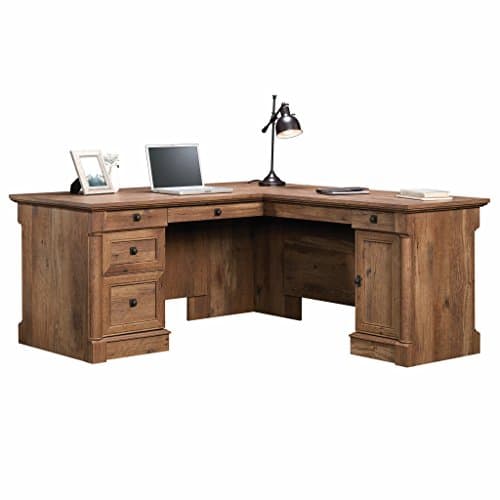
Sauder
Sauder Palladia L-Shaped Desk
2. Tribesigns L-Shaped Corner Desk — Best Budget
At under $120, the Tribesigns delivers the corner configuration at a price that makes it essentially risk-free to try. The 55"×55" footprint gives each arm a full monitor-and-keyboard span. The carbon fiber texture surface resists light scratches and fingerprints better than plain laminate. At under 50 lbs assembled, it's the easiest desk on this list to move, disassemble, and carry to a new space.
The trade-off is honest: zero storage. No drawers, no shelves, no cable tray. You get a clean working surface and a metal frame, nothing else. If you need drawers, budget $35–50 for a separate under-desk drawer unit and you're still under the Sauder's price.
For how straight desk alternatives at this budget compare, see our best home office desks under $200.
Pros
- Under $120, lowest price of any pick here
- Carbon fiber texture surface resists light scratches and fingerprints
- Two built-in grommet holes for cable routing
- Metal frame is genuinely sturdy for the price
- Under 50 lbs, easiest to move and reassemble
Cons
- No storage, zero drawers, shelves, or cubbies
- Arm depth is narrower than some buyers expect; verify the spec before ordering
- Surface finish can separate at edges with heavy long-term use
- Customer support response times are slow for returns or replacements
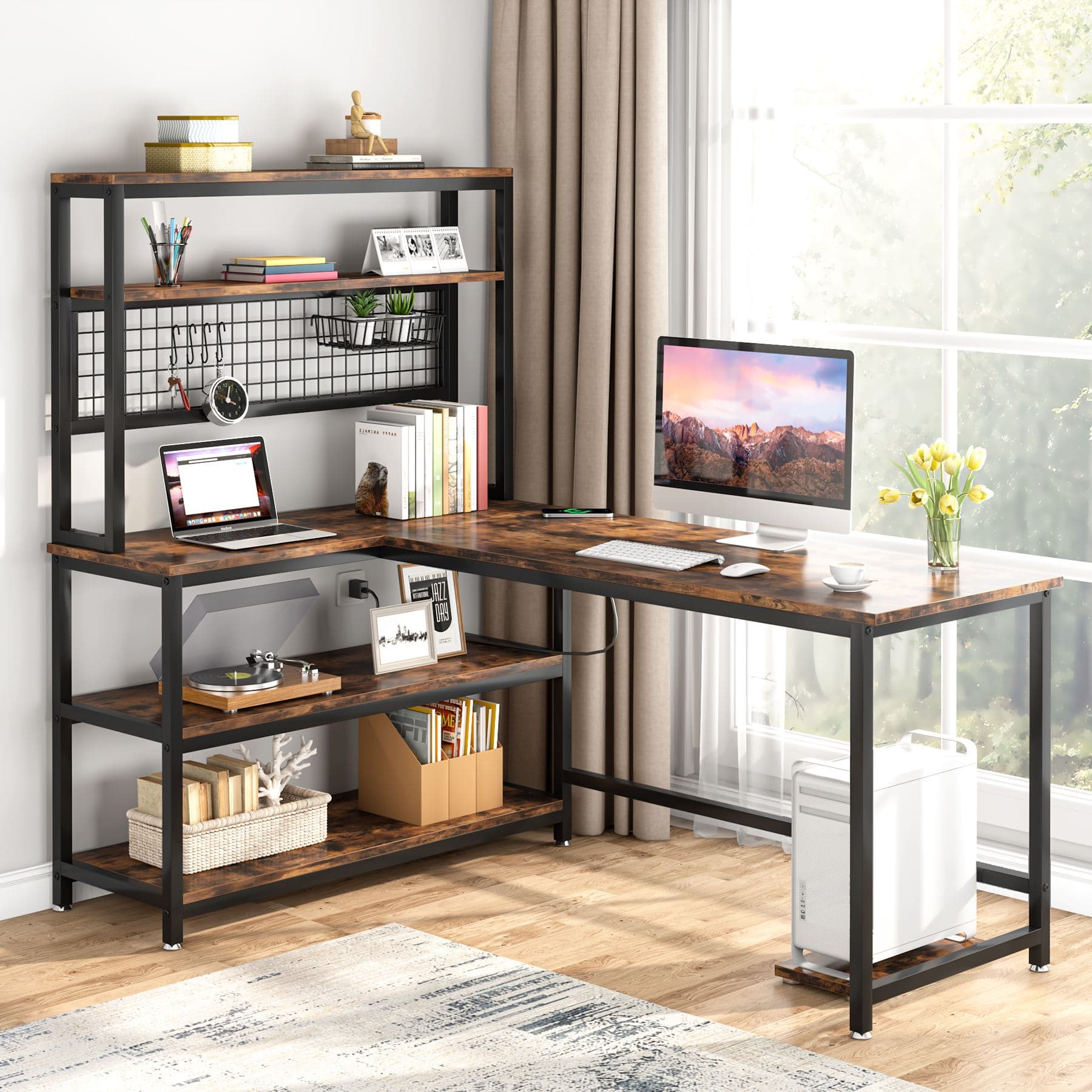
Tribesigns
Tribesigns L-Shaped Corner Desk
3. Bush Furniture Cabot L-Shaped Desk — Best Premium Wood
The Bush Cabot is the only pick here built from solid hardwood maple, not composite, not veneer over particleboard. The difference shows in two places: dovetail drawer joints (significantly stronger than standard staple-and-glue construction) and ANSI/BIFMA compliance, a third-party commercial durability standard that most residential desks don't bother meeting.
The 60"×60" total surface handles a full dual-monitor setup on the primary arm with generous room for a laptop stand or document tray on the return. The full-extension file drawer pulls out completely without tipping, a detail absent from budget alternatives.
Citation capsule: Bush Furniture's Cabot L-Shaped Desk meets ANSI/BIFMA X5.5 commercial durability standards, a third-party certification covering load-bearing capacity and structural integrity typically associated with commercial office environments. BIFMA (2024) standards require certified desks to withstand load testing far exceeding normal residential use, making the Cabot a genuine long-term investment for home office workers who won't replace furniture every few years.
Pros
- Solid hardwood maple, real wood construction, not composite or veneer
- Dovetail drawer joints: noticeably stronger than standard construction
- Full-extension file drawer handles legal and letter-size files
- ANSI/BIFMA commercial-grade certification, third-party verified durability
- 60"×60" total surface, comfortable for a full dual-monitor setup
Cons
- ~$380, most expensive fixed-height pick by a significant margin
- Heavy (~140 lbs), difficult to move without help
- Traditional aesthetic won't suit minimalist or modern tech setups
- Assembly takes 3–4 hours
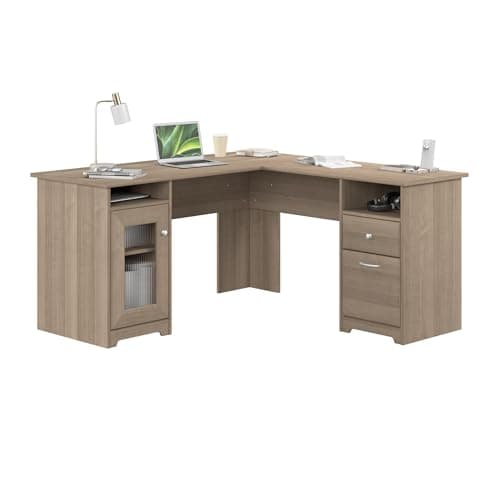
Bush Furniture
Bush Furniture Cabot L-Shaped Desk
4. FlexiSpot E7L L-Shaped Standing Desk — Best Standing L-Shaped
The FlexiSpot E7L sits in a different category from the other four picks. It's the only one with electric height adjustment, meaning you get the L-shape corner configuration AND the ability to alternate between sitting and standing throughout the workday. Dual motors drive the adjustment from 27.9" to 47.6", covering the ergonomic range for most adults. The 355 lb capacity handles a heavy dual-monitor setup without any frame flex at standing height.
NIOSH recommends alternating between sitting and standing every 30–60 minutes to reduce lower back fatigue. A fixed-height L-desk can't give you that. At $650, you're paying for both the corner surface and the motorized mechanism, neither one compromised for the other.
If you're still deciding whether the standing desk workflow fits your habits, our best standing desks for 2026 guide covers that decision in detail before you commit.
Pros
- Electric dual-motor height adjustment: 27.9"–47.6"
- 355 lb capacity, handles dual monitors plus desktop equipment
- 63"×47" L-shaped top with full corner coverage
- Programmable height presets: save sitting and standing positions
- 3-stage legs for better stability and height range
Cons
- ~$650, most expensive pick by a significant margin
- Frame assembly is involved before attaching the L-top
- Some configurations sell frame and top separately, verify before ordering
- Heavier than fixed-height desks
FlexiSpot
FlexiSpot E7L L-Shaped Standing Desk
5. Walker Edison Soreno L-Shaped Desk — Best for Small Spaces
The Walker Edison Soreno is built for one specific buyer: someone with under 120 sq ft of office space who wants the corner-desk shape without the bulk of furniture-style options. At 51"×51" with a slim metal frame, it fits cleanly into tight corners while providing roughly 12 sq ft of working surface, 50% more than a standard 48" straight desk.
At 47 lbs total, it's the only desk on this list that one person can reasonably carry, disassemble, and transport to a new place without help. The tempered glass top looks sharp but shows every smudge and scratches without a desk mat. The standard MDF/laminate finish is the more practical daily-use choice.
For other small-space desk alternatives, see our small home office desk ideas under 48 inches.
Pros
- Compact 51"×51" footprint, smallest L-shape of the five picks
- Only 47 lbs, easiest to move, reassemble, and transport
- Tempered glass top available for a clean, modern aesthetic
- Assembles in under 30 minutes
- ~$130, minimal price premium over a comparable straight desk
Cons
- No storage, purely a work surface
- Tempered glass version shows every smudge and requires a desk mat
- Arm depth is narrower than furniture-style desks at the same arm span
- Metal frame powder coat shows fingerprints
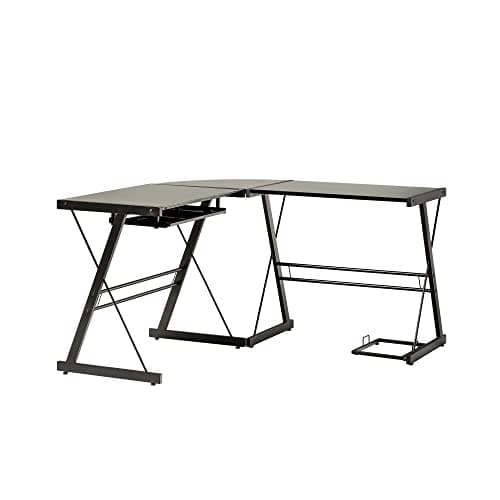
Walker Edison
Walker Edison Soreno L-Shaped Desk
How to Size an L-Shaped Desk for Your Corner
"Measure the room" is the standard advice. It's necessary but incomplete, here's the full sequence.
Step 1: Measure the corner clearance. From each wall, measure the clearance along both surfaces. Each arm needs at least 48" of wall length, and you need at least 24" of clearance behind the desk for your chair. In a 9×9 ft room, a 60"×60" L-desk leaves under 3 feet on each side, tight enough to feel cramped for most users.
Step 2: Check arm depth separately. L-desk dimensions list arm length first, that's not arm depth. A "55"×55"" desk typically has 20"–24" of depth per arm. Depth determines how far from the wall you sit and whether your monitors land at a comfortable 20"–24" viewing distance. Always verify this number on the product spec sheet before ordering.
Step 3: Size arms by function, not symmetry. The primary arm, the one you face when seated, should be at least 55" wide for a dual-monitor setup. The return arm can be shorter: 45"–48" is enough for a secondary display or laptop stand.
Citation capsule: According to the NAIOP Research Foundation (2024), the average North American home office occupies 100–150 sq ft. In a room this size, an L-shaped desk placed in one corner uses otherwise dead space efficiently, each arm follows a wall, leaving the room's center open for movement and avoiding the cramped feeling of a large straight desk pushed against a single wall.
Pairing your L-desk with adjustable monitor arms frees up significant surface area on both arms, monitors mounted on arms rather than stands return 6–8 inches of usable depth per screen.
Frequently Asked Questions
Are L-shaped desks good for small home offices?
Yes, they use corner space that goes unused in standard desk setups. The Walker Edison Soreno at 51"×51" provides roughly 12 sq ft of working area versus 8 sq ft for a standard 48" straight desk, using dead corner footage. The NAIOP Research Foundation (2024) notes the average North American home office is 100–150 sq ft, where corner efficiency matters significantly.
What is the standard size of an L-shaped desk?
Most L-shaped desks span 48–66 inches per arm, with 20–24 inch arm depth. Product listings lead with arm length, not depth, always check depth separately. It determines how far from the wall you sit and whether a 24" monitor fits at a comfortable viewing distance. Standard fixed height is 28–30 inches for sitting-only models.
Can you get an L-shaped standing desk?
Yes, the FlexiSpot E7L (~$650) is the leading option in 2026. It has electric dual-motor height adjustment from 27.9" to 47.6", a 63"×47" L-shaped surface, and a 355 lb weight capacity. Standard L-shaped desks are fixed height and can't be reliably converted to standing height with off-the-shelf risers, the frame geometry doesn't support it.
How much weight can an L-shaped desk hold?
Furniture-style L-desks (Sauder, Bush Furniture) typically support 150–200 lbs distributed across the surface. Panel-style models (Tribesigns, Walker Edison) usually support 100–150 lbs. The FlexiSpot E7L rates highest at 355 lbs. For a dual-monitor setup with a desktop PC and peripherals, aim for at least a 100 lb surface rating.
Is a reversible L-shaped desk worth it?
Yes, reversible desks let you position the return arm on either side, so one desk fits both left-corner and right-corner room layouts. All five picks in this guide are reversible. This matters most if you may move the desk to a different room or a new home, since it eliminates the need to buy a replacement just because the corner flipped.
Which L-Shaped Desk Should You Get?
For most home office workers, the Sauder Palladia is the practical call, solid surface, integrated file storage, and a 66" primary arm for under $250. If budget is the hard constraint, the Tribesigns delivers the L-shape for $120 with no real compromise on the working surface itself. For real hardwood and commercial durability, the Bush Cabot earns its $380 price. If your workflow needs standing, the FlexiSpot E7L is the only purpose-built L-shaped standing desk worth buying in 2026. And for small spaces or renters, the Walker Edison Soreno is the lightest and most portable of the five.
Key takeaways:
- Workers with 60"+ of surface report 31% fewer task interruptions (BIFMA, 2024)
- Decide whether you need storage in the desk before filtering by price
- Always check arm depth separately from arm length
- Size the primary arm for your monitor setup, not for a perfect square footprint
Once the desk is in place, add proper cable management and ergonomic accessories to complete the workspace.