Most guides to the best cable management for desks tell you to buy cable ties and call it done. That misses the actual problem.
There are three distinct cable problems a home office desk has — and the solution that fixes one often does nothing for the others. Cables on the floor are a trip and fire hazard. Cables on the desk surface create visual clutter that measurably degrades focus. Cables running up the wall or desk leg without a path look chaotic and get caught in standing desk mechanisms. Each problem needs its own fix.
Jake Pitos has configured and reviewed more than a dozen home office setups over three years of remote work. This guide separates those three problems and picks the best product for each — then shows you how to combine them into a system that actually works.
TL;DR: The under-desk cable tray is your starting point, it lifts power strips and cables off the floor in one move. Add J-channel raceways for any runs along walls or desk legs, a cable management box to hide the power strip itself, and velcro ties to bundle individual cables cleanly. Princeton University neuroscience research shows that visual clutter in your field of view suppresses neural activity and degrades focus, a clean desk isn't just aesthetic, it's measurably better for deep work.
Why Cable Clutter Costs More Than It Looks
Princeton University's Neuroscience Institute published research in the Journal of Neuroscience showing that multiple stimuli competing in the visual field mutually suppress neural activity throughout the visual cortex (Princeton / Journal of Neuroscience, 2011). In plain terms: visible clutter on and around your desk competes for your brain's attention, even when you're not consciously looking at it. Cable spaghetti isn't just an eyesore, it's a background drain on focus throughout the workday.
The productivity case for cable management is stronger than most people expect, but the safety case is stronger still. The U.S. Consumer Product Safety Commission estimates approximately 4,600–5,000 residential fires per year are associated with extension cords, causing 70–85 deaths and around 230 injuries annually (CPSC). The NFPA separately reports that electrical wire and cable insulation is the most frequently ignited material in home electrical fires, involved in 32% of all such incidents (NFPA, 2022 report). Cables bundled tightly without airflow, running under rugs, or pressed against heat-generating adapters are the most common ignition scenarios.
Gallup data from Q2 2025 shows that remote-capable workers now spend the majority of their workweek at home, 51% work hybrid schedules, with 46% of their hours at a home desk (Gallup, 2025). That's a lot of daily hours spent in a space where poor cable management creates both productivity drag and genuine hazard. Fixing it once is worth the effort. If you're also thinking about lighting while you're setting up, our best desk lamps for home office guide covers that next.
The 4 Best Cable Management Solutions for Desks in 2026
1. Under-Desk Cable Tray — Best Overall
Best for
Anyone starting from zero. A cable tray is the single highest-impact change you can make, it gets everything off the floor and creates a central cable path in one step.
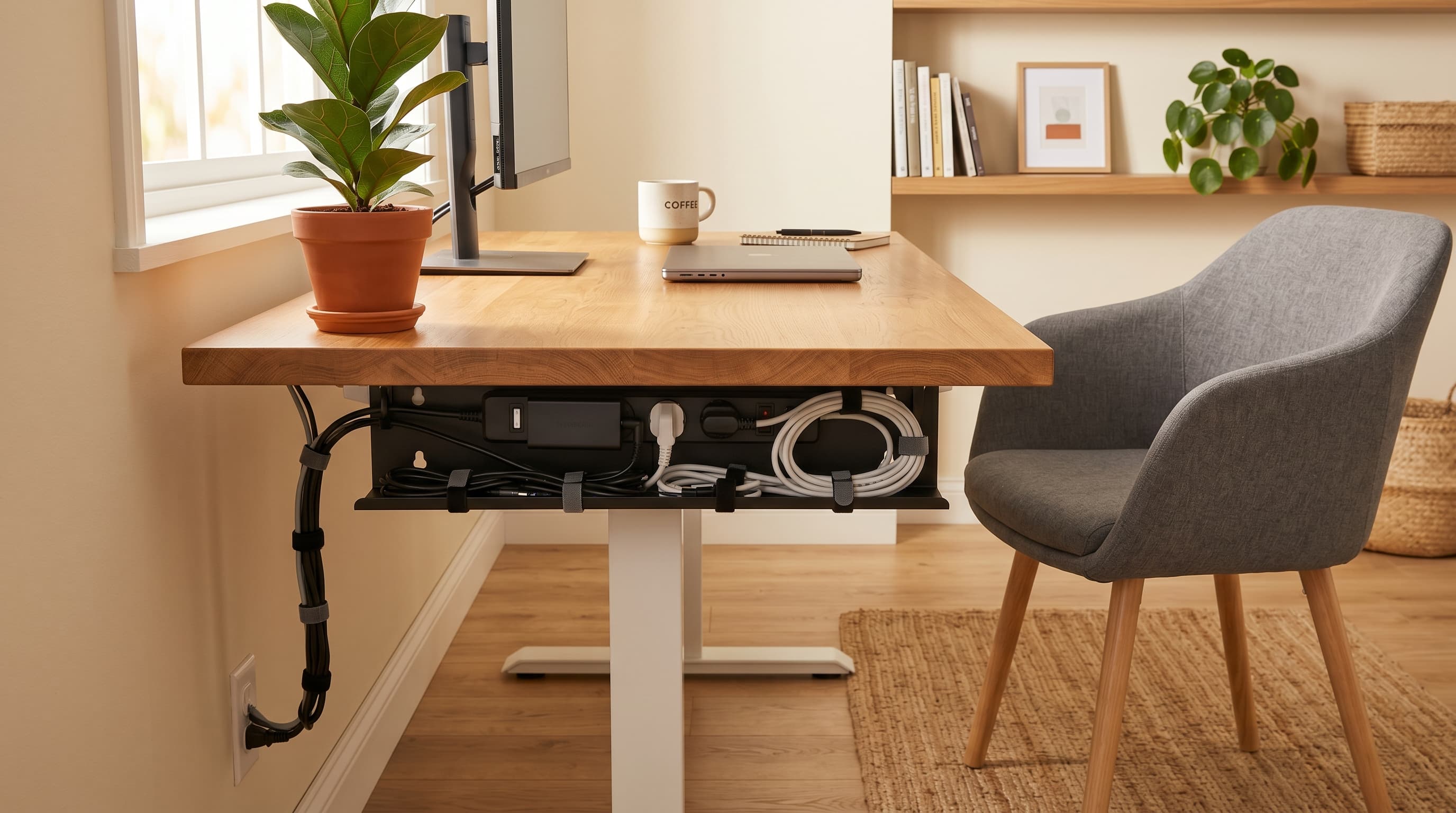
An under-desk cable tray mounts beneath your desk surface (either with clamps or screws) and holds your power strip, excess cable slack, and adapters off the floor. The impact is immediate and dramatic: everything that was sitting on the floor or running across it disappears. Cable runs from desk to wall drop straight down into the tray instead of sprawling outward.
Our finding: Switching from floor-cable chaos to a clamped under-desk tray eliminated visible cables entirely from the front and sides of the desk. The tray also repositioned the power strip from a reachable floor location to a fixed under-desk mount, which makes it easier to switch cables without crawling. The most underrated benefit: vacuuming the floor under your desk becomes trivial instead of a choreographic puzzle.
The best trays are metal mesh or perforated steel, they allow airflow, which matters because power strips and adapters generate heat. Avoid enclosed plastic designs for power strip storage. Look for a clamp-mount design if you don't want to drill into your desk; most desks with a thick enough top edge will hold a clamp tray securely.
Pros
- Eliminates floor cable clutter in a single installation
- Creates a fixed, organized cable path for all desk runs
- Clamp-mount versions require zero drilling or permanent modification
- Metal mesh design allows airflow around heat-generating adapters
- Also hides the power strip itself, clean look from all angles
Cons
- Clamp designs require a desk edge at least 1.5" thick, measure first
- Tray capacity is finite, larger setups may need two trays
- Installation takes 10–15 minutes but needs another person to hold it level
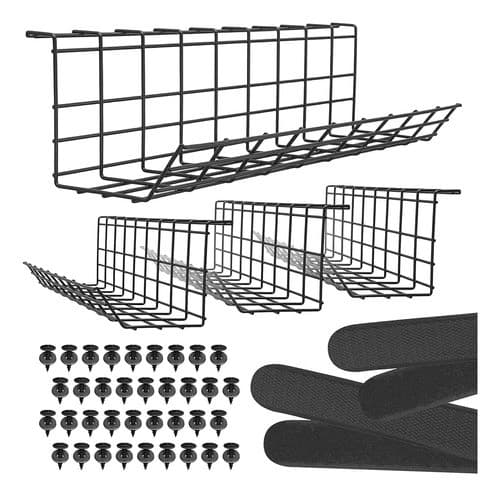
Mount-It!
Under-Desk Cable Management Tray
Clamp-mount metal mesh tray lifts your power strip and cables off the floor in one install, the highest-impact cable management upgrade for any desk.
2. J-Channel Cable Raceway — Best for Wall and Leg Runs
Best for
Standing desks and setups where cables need to travel from desk to wall or along a baseboard. The J-channel creates a contained, clean cable path for any run that can't go directly into the under-desk tray.
J-channel cable raceways are U-shaped plastic or aluminum channels that mount to walls, desk legs, or baseboards via adhesive backing or screws. Cables snap into the channel and are covered by a clip-on or sliding lid. The result is a flat, wall-following cable route that's nearly invisible from any normal viewing angle.
According to a 2024 study of 614 U.S. and Canadian workers published in the Journal of Environmental Psychology, workstation furniture quality and organization ranks as one of the four strongest predictors of perceived work performance, alongside temperature, noise, and aesthetics (ScienceDirect / Journal of Environmental Psychology, 2024). A cable raceway turns the visual chaos of cables running across a wall into a single clean architectural line.
J-channels are especially important for standing desks. When a desk moves up and down, cables that aren't routed through a flexible path bind, pull, and eventually damage the cable jacket or the connector. Running cables through a ceiling-to-desk raceway with a coiled slack section at the transition point, rather than just letting them dangle, is the standard fix for this.
Pros
- Creates a clean, architectural cable line along any wall or desk leg
- Available in white, black, or wood-grain to match most desk setups
- Essential for standing desks, prevents cable binding during height adjustment
- Adhesive-backed versions require no drilling for lighter cable loads
- Covers any length of cable run, cut to size with scissors or a utility knife
Cons
- Adhesive backing can leave residue on walls, test in a hidden area first
- Painted drywall is the most compatible surface, some textured walls won't hold
- Screwed versions require drilling but hold heavier, thicker cable bundles
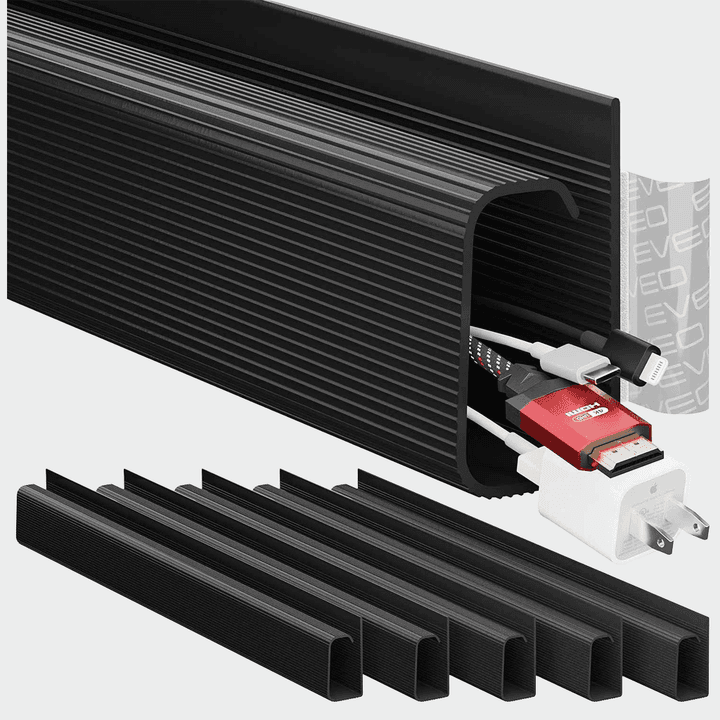
Electriduct
J-Channel Cable Raceway Kit
Adhesive-backed channels create a clean cable line along any wall or desk leg. Essential for standing desks, prevents cable binding during height adjustment.
3. Desktop Cable Management Box — Best for Hiding Power Strips
Best for
Anyone who puts their power strip on or near their desk surface and wants it completely hidden. The box contains the power strip, the cable bulk, and the wall plug, leaving only one clean cable exiting the box.
A cable management box is an open-bottom container that sits over your power strip and cable adapters, hiding all of it from view. The power strip goes in, the wall cable exits through a slot in the back, and peripheral cables enter through openings on the sides. From the desk, all you see is a clean box instead of a tangle of adapters and cords.
The safety caveat here matters more than most product listings mention. A 2022 NIH-indexed experimental study found that household chaos, including clutter and disorganized environments, causally increased physiological stress markers in occupants (PMC/NIH, 2022). The cable management box addresses the visual stress component, but it introduces a thermal management question: power strips and adapters generate heat, and enclosing them reduces airflow. The rule is simple: never fill a cable box completely. Leave at least 30% of the interior volume empty, and choose a box with ventilation slots or a mesh panel on at least one side.
For desktop use, this is the cleanest-looking solution available, it literally makes the power strip disappear. For under-desk use, the cable tray is the better choice (more airflow, more capacity). The cable box belongs on or near the desk surface.
Pros
- Completely hides power strip and adapter bulk from view
- One clean cable exit instead of 4-6 cords going in different directions
- Available in materials that match desk aesthetics (wood-grain, white, black)
- No installation, just place it where the power strip was
Cons
- Thermal concern, cables and adapters generate heat; don't overfill
- Fixed footprint on your desk or floor, reclaims no space, just hides the clutter
- Not suitable for heavy-load power strips or setups with many large adapters
D-Line
Desktop Cable Management Box
Completely hides your power strip and adapter bulk, one clean cable exit instead of 4–6 cords going different directions. No installation required.
4. Velcro Cable Ties — Best for Bundling Individual Cables
Best for
Bundling individual cables anywhere in the system, tray, raceway, or desktop. Velcro ties are the lowest-tech piece of the system and the one you'll use most often.
Velcro cable ties are reusable hook-and-loop straps that bundle cables together or secure them to a surface. They cost almost nothing, work everywhere, and are the only truly reversible cable management tool, adding or removing a cable takes 3 seconds. Zip ties, by contrast, require cutting, which means every configuration change is a destructive operation.
The right use for velcro ties is within the other systems, bundling the cables inside a tray so they don't shuffle around, grouping monitor cables together before they enter a raceway, or gathering the slack behind a desktop so it doesn't puddle. They're not a standalone solution for visible cable runs (they don't hide cables, only organize them), but every cable management setup needs them.
Buy the shortest ties that work for your cable diameter. Most office setups use 6" or 8" ties. Longer ties create a visible tail that looks sloppy at the buckle. Cable diameter matters too, very thin USB cables work fine with standard velcro, but thick power cables need a wider strap to hold without sliding.
Pros
- Fully reusable, no cutting, no damage, reconfigure any time
- Works on any cable diameter from USB-C to thick power cords
- Inexpensive, a pack covers an entire desk for under $10
- Self-cinching, won't loosen over time the way zip ties can
Cons
- Doesn't hide cables, organizes and bundles, but cables remain visible
- Velcro collects lint and dust over time, which reduces grip, clean periodically
- Can mark or imprint soft cable jackets if overtightened
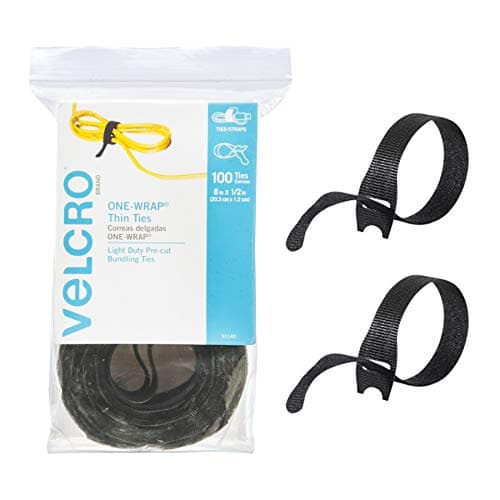
VELCRO Brand
Velcro One-Wrap Cable Ties
Fully reusable hook-and-loop ties, add or remove a cable in 3 seconds with no cutting. The lowest-tech piece of any cable management system and the one you use most.
How to Choose the Right Cable Management System
Start with the floor problem
If cables are on the floor, whether pooling under the desk, running across the room, or draped across traffic areas, the under-desk cable tray is always the first purchase. Every other solution assumes cables have a path to travel; the tray creates that path. Install this first, let the power strip and excess slack live there, then evaluate what's left.
Map your cable types before buying
Not all cables are the same thickness or flexibility. USB-C and DisplayPort cables are thin and flexible; power cables and surge protector cords are thick and stiff. A J-channel raceway designed for thin USB cables won't accommodate a 14-gauge power cord. Before buying any raceway or box, physically measure the thickest cable you need to route and compare it to the product's cable capacity spec.
Consider permanence
Adhesive-backed raceways and boxes look cleaner than clamp or screw-mounted options, but removing them damages wall paint and can pull drywall paper. Clamp-mount trays and velcro-only solutions are fully non-destructive, important for renters or anyone who reconfigures their desk regularly. If you own your home and your desk layout is fixed, adhesive solutions are fine. Otherwise, stick to non-adhesive.
Standing desk users: plan the transition point
The single most common cable management mistake on standing desks is forgetting to account for the lifting mechanism. Cables that run from the floor straight to the desk surface bind when the desk rises, eventually pulling connections loose or damaging cable jackets. The fix is a cable spine (a spiral wrap or sleeve) along the desk column with enough slack to accommodate the full height range. Route all desk cables through the spine before connecting them to the tray at the top. For more on standing desk setup and posture, see our home office ergonomics guide, or if you're still choosing a desk, our best standing desks guide covers cable management compatibility across every price tier.
Quick Comparison
| Solution | Best For | Installation | Reversible? | Approximate Cost |
|---|---|---|---|---|
| Under-Desk Cable Tray | Floor cable elimination | Clamp or screw mount | Yes (clamp) | $20–$40 |
| J-Channel Raceway | Wall and leg cable runs | Adhesive or screw | Partial | $10–$25 |
| Cable Management Box | Hiding power strips on desk | None (place and go) | Yes | $20–$35 |
| Velcro Cable Ties | Bundling within any system | None | Yes | $8–$15 |
What We Recommend
For most home office setups: start with the under-desk cable tray. Mount it under your desk, move your power strip into it, and zip the excess cable slack in after it. That single change eliminates 80% of the visible cable problem. Then add velcro ties to bundle the cables that route out of the tray to your monitors and peripherals.
If you have any cables running along a wall or up a standing desk column, add the J-channel raceway to those specific runs. It doesn't need to be everywhere, just the visible sections that couldn't be handled by the tray alone.
The cable management box is worth adding if your power strip is on or near your desk surface rather than under it. It's the best available solution for that specific scenario and requires no installation.
All four together cost under $100 and solve the problem permanently. A quality power strip is the foundation of clean cable routing, our best power strip for desk 2026 covers flat-plug options that mount neatly under your desk alongside a cable tray. For related setup upgrades, see our best monitor arms guide, freeing up desk real estate with a monitor arm is the natural next step after getting cables under control. If you use a laptop, a docking station routes all peripherals through one cable, dramatically reducing the number of individual cables to manage from the start.
Frequently Asked Questions
What is the best way to manage cables under a desk?
A metal under-desk cable tray is the most effective starting point, it lifts cables off the floor, hides your power strip, and creates one central cable route. Pair it with velcro ties to bundle individual cables and a J-channel raceway for any runs up the wall or desk leg.
Are under-desk cable trays worth it?
Yes, for most home office setups. A good under-desk tray costs $20–$40 and permanently eliminates the floor cable problem. The CPSC estimates 4,600+ residential fires per year are caused by mismanaged extension cords, proper cable routing isn't just aesthetic, it's a safety issue.
How do you hide cables from a standing desk?
Use a cable spine or cable sock along the desk column for the lifting cables, and a J-channel raceway along the back edge of the desk for power and peripherals. The key is creating a dedicated cable path that moves with the desk height adjustment without binding or pulling.
What cable management doesn't damage desk or wall surfaces?
Velcro ties and clamp-mount cable trays are fully non-destructive, no adhesive, no drilling. Adhesive J-channels and cable raceways leave residue if removed. For renters or anyone who doesn't want to commit, clamp-mount trays and tie-based bundling systems are the safest options.
Can poor cable management cause fires?
It's a real risk. The NFPA reports that electrical wire and cable insulation is the most frequently ignited material in home electrical fires, involved in 32% of all such incidents. Bundled cables generating heat, cables running under rugs, and overloaded extension cords in cable boxes are the most common causes.
How many cables can I put in a cable management box?
Most standard cable management boxes (10–12 inch models) comfortably hold one power strip plus 4–6 cable adapters. Don't fill them to the brim, cables and adapters generate heat, and restricted airflow in an enclosed box raises ambient temperature. Leave at least 30% of interior volume free.