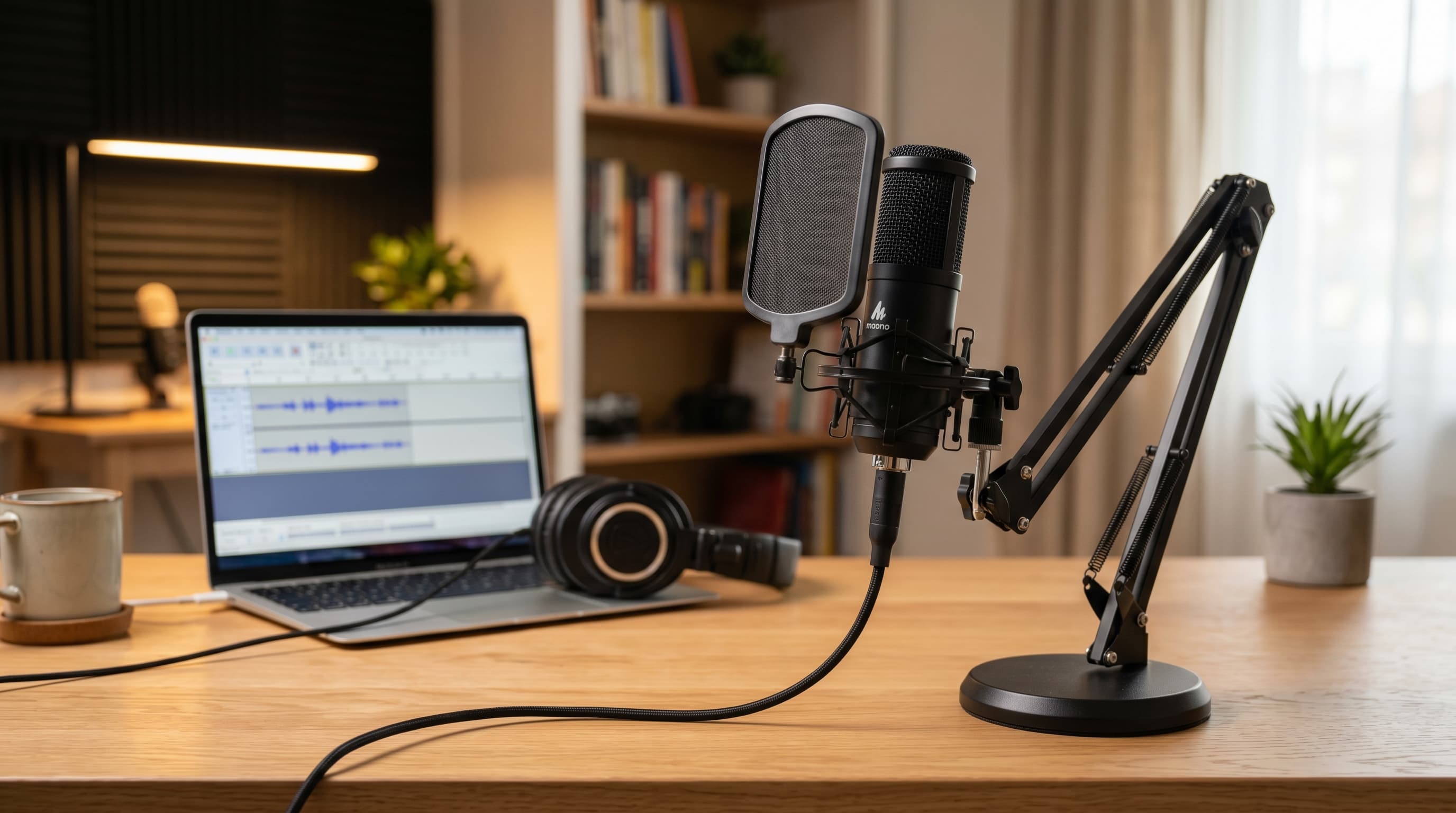
Your laptop microphone is the weakest link in your home office setup. It's omnidirectional, which means it picks up everything equally — keyboard clicks, HVAC hum, room echo, and your voice all arrive at the same level. It sits 18–24 inches away from your mouth, which means your voice competes with every other sound in the room for signal. And video call codecs like Opus compress that already-degraded audio further, amplifying the problem for everyone listening. A USB condenser microphone fixes all three issues for $49–$130. The five picks below cover every home office scenario: bare-minimum call quality, content creation crossover, noisy rooms, and tight budgets.
TL;DR: The HyperX SoloCast (~$49) is the best USB microphone for home office video calls — cardioid polar pattern, tap-to-mute, plug-and-play USB, and the smallest footprint. For podcast and content crossover, step up to the Blue Yeti. For noisy home offices, the Samson Q2U dynamic is the right tool. Remote workers now average 7.3 video calls per week (Flowtrace/Speakwise, 2026), audio quality affects how every one of those calls is perceived.
Related: home office video call setup guide
Why Do Laptop Microphones Sound So Bad?
Laptop microphones fail for three specific technical reasons, not general cheapness. The omnidirectional polar pattern captures sound equally from every direction, your voice, your keyboard, your ceiling fan, and the neighbor's lawnmower all hit the capsule at roughly the same level. That's a fundamental design problem, not a quality problem. No amount of software processing fully recovers from a bad polar pattern.
The second issue is distance. A laptop mic sits 18–24 inches from your mouth during a typical call. Sound pressure drops with the square of distance, so doubling the distance reduces the signal level by 6 dB. A mic at 20 inches receives roughly one-sixteenth the sound pressure of a mic at 5 inches. Your voice signal is weak; the room noise is not.
The third issue is analog-to-digital conversion. Laptop ADCs are optimized for cost, not fidelity. The noise floor, the hiss and hum present even in silence, is noticeably higher than a dedicated USB microphone's internal components. Video call codecs then compress this already-noisy signal, and the artifacts that result are what people hear as "bad audio."
What a USB condenser microphone changes is all three problems at once. A cardioid polar pattern rejects sound from the rear and sides by 15–25 dB. Positioned 4–8 inches from your mouth, your voice dominates the signal. A dedicated audio interface chip (the circuitry inside every USB mic) has a much lower noise floor than a laptop's integrated audio.
The most common USB microphone mistake is positioning it too far away. Condenser microphones are designed to be used at 4–8 inches from your mouth, not 18 inches away on a desk stand. A Blue Yeti at 18 inches sounds noticeably worse than a $49 SoloCast at 6 inches. Distance matters more than the microphone model. This is the single adjustment most people never make.
Citation capsule: Remote workers average 7.3 video calls per week, nearly three times more than in-office workers at 2.6 calls per week (Flowtrace/Speakwise, 2026). With video meetings up 192% since February 2020 (Microsoft Work Trend Index, 2023), audio quality on those calls has shifted from a nice-to-have to a daily professional variable that colleagues notice and evaluate.
The 5 Best USB Microphones for Home Office in 2026
| Microphone | Type | Polar Pattern | Best For | Price |
|---|---|---|---|---|
| HyperX SoloCast | Condenser | Cardioid | Best overall for calls | ~$49 |
| Blue Yeti | Condenser | Multi-pattern | Calls + content creation | ~$129 |
| Elgato Wave:3 | Condenser | Cardioid | Professional calls + streaming | ~$149 |
| Samson Q2U | Dynamic | Cardioid | Noisy home offices | ~$69 |
| Rode NT-USB Mini | Condenser | Cardioid | Best audio quality under $100 | ~$99 |
HyperX SoloCast — Best Overall for Video Calls
The HyperX SoloCast is the clearest answer for home office video calls: cardioid-only, plug-and-play USB-C, a physical tap-to-mute button on the capsule, and a compact tripod stand that takes up almost no desk space. At $49, it's the lowest-friction upgrade from a laptop microphone available today.
After switching to the SoloCast, the first comment from colleagues wasn't about sound quality in the abstract, it was "did you get a new microphone?" within two calls. The tap-to-mute button turns out to be more useful than it sounds. When you're on a call and need to cough, sneeze, or respond to someone in the room, a physical mute you can hit without looking at your screen is genuinely different from software mute. It's the kind of feature you reach for constantly once you have it.
The cardioid pattern is tight and well-tuned. Keyboard noise, which kills most condenser mics at close range, is handled well as long as the mic is positioned above desk level and angled slightly downward toward your mouth, which the flexible stand makes easy.
Pros
- Tap-to-mute capsule button, physical mute without navigating software
- Cardioid pattern handles keyboard noise well at close positioning
- USB-C plug-and-play, no drivers, works on Mac, Windows, and iPad
- Smallest footprint on this list, takes almost no desk space
- Best price-to-performance ratio for video calls
Cons
- Cardioid only, no polar pattern flexibility for recording scenarios
- No headphone monitoring jack, can't monitor your own voice in real time
- Basic stand, a boom arm improves positioning significantly
Best for: Remote workers on regular video calls who want the simplest, most effective laptop mic upgrade.
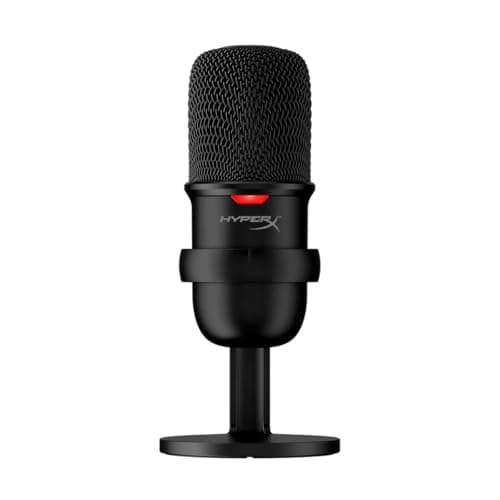
HyperX
SoloCast
Cardioid polar pattern with tap-to-mute capsule button and plug-and-play USB-C, the clearest laptop mic upgrade at the lowest friction and price.
Blue Yeti — Best for Calls + Content Creation
The Blue Yeti is the most versatile USB microphone on this list: four polar patterns (cardioid, stereo, omnidirectional, bidirectional), a headphone monitoring jack with zero-latency playback, a gain knob, and a mute button with LED status indicator. It's significantly larger than the SoloCast, but that size houses genuine flexibility. If you're already recording podcast episodes, voiceovers, or YouTube content alongside your call schedule, the Yeti handles every use case.
For video calls, set it to cardioid, position it 6–8 inches from your mouth, and it sounds noticeably cleaner than the SoloCast, particularly in the 200–3,000 Hz range where voice presence lives. The difference between the two isn't dramatic for calls, but it's there. Where the Yeti earns its price is when you record content and use stereo or omnidirectional mode. The SoloCast can't do that.
The Yeti's size is a real consideration. It's 47% heavier than the SoloCast and takes up noticeably more desk real estate. A boom arm is almost mandatory at this size, you want it off your desk surface and positioned properly, not sitting in front of your keyboard.
Pros
- Four polar patterns, cardioid for calls, stereo/omni for content recording
- Zero-latency headphone monitoring jack, hear yourself while recording
- Gain knob and mute button with LED status light on the unit
- Noticeably richer voice presence than the SoloCast at close range
- The benchmark USB condenser for a decade, proven, reliable, well-supported
Cons
- Large and heavy, a boom arm is almost required to use it properly
- Picks up more room noise than the SoloCast in reverberant spaces
- At $129, overkill if your only use case is video calls
Best for: Remote workers who also record podcasts, voiceovers, or video content and want one microphone for both use cases.
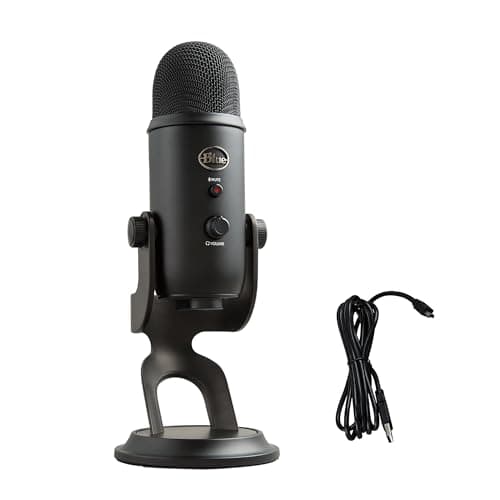
Blue
Yeti
Four polar patterns, zero-latency headphone monitoring, and gain control, the go-to for video calls plus podcast or content recording crossover.
Elgato Wave:3 — Best for Professional Calls + Streaming
The Elgato Wave:3 is the most technically sophisticated condenser on this list. Its Clipguard system uses two capsules, a primary capsule and a secondary at lower gain, and switches to the secondary automatically if the primary clips. The result is clean audio even when you raise your voice suddenly, which is common on calls when you're animated or presenting. At $149, it's the most expensive pick here, but the Wave Link software integration makes it the most controllable.
Wave Link acts as a virtual mixer inside your computer: you can set separate gain levels for your microphone, desktop audio, and any other source, then route different mixes to headphones and to the output your call platform receives. For someone who runs video calls, music for focus, and a secondary microphone simultaneously, that level of control is genuinely useful. For someone who just wants cleaner call audio, it's more software than they need.
The cardioid pattern is precise and rejects keyboard noise well. The USB-C connection and plug-and-play compatibility are standard. The headphone jack with zero-latency monitoring is present, a feature the SoloCast lacks.
Pros
- Clipguard dual-capsule system prevents clipping during loud speech
- Wave Link virtual mixer, separate gain routing for calls vs. headphone monitoring
- Precise cardioid pattern with excellent keyboard noise rejection
- Zero-latency headphone monitoring via 3.5mm jack
- USB-C plug-and-play, compatible with Mac and Windows
Cons
- Most expensive pick at $149, cost only justified if you use Wave Link
- Wave Link adds software complexity most call-only users don't need
- Clipguard mainly helps content recorders, less relevant for normal calls
Best for: Streamers and content creators who also need a primary call microphone, and want a software mixer without a hardware audio interface.
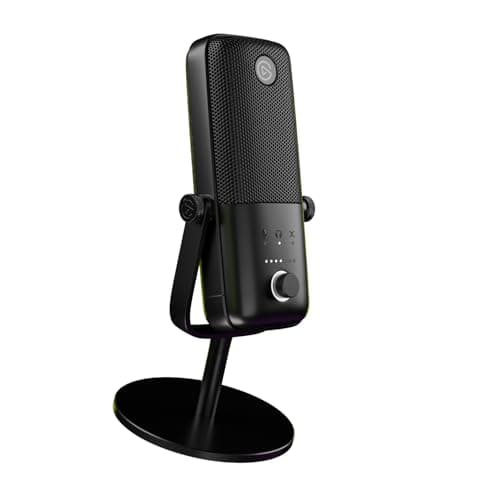
Elgato
Wave:3
Clipguard dual-capsule system prevents clipping on loud speech, Wave Link virtual mixer routes separate gain levels for calls and headphone monitoring.
Samson Q2U — Best for Noisy Home Offices
The Samson Q2U is a dynamic microphone, which makes it fundamentally different from every other pick on this list. Dynamic microphones are less sensitive than condensers, they require you to speak closer to the capsule (2–4 inches rather than 4–8 inches) but reject background noise dramatically better. In an open-plan home, a shared apartment, or any space with unpredictable ambient noise, the Q2U will outperform a condenser mic that costs twice as much.
At $69, it's also the only microphone on this list that includes both USB and XLR outputs. That means you can use it plug-and-play now and, if you ever upgrade to an audio interface, switch to XLR without buying a new microphone. That upgrade path is worth paying attention to if you're serious about audio quality long term.
The Q2U is the broadcast-style microphone that podcasters and radio hosts use: cardioid dynamic with a frequency response tailored to the human voice range, rejection of off-axis sounds, and very little sensitivity to room reverb. It won't capture acoustic guitar beautifully. It will make your voice sound clean and present even when a lawnmower is running outside.
Pros
- Dynamic capsule rejects background noise far better than any condenser here
- Both USB and XLR outputs, future-proof upgrade path to an audio interface
- Very low sensitivity to room echo and reverb
- Cardioid pattern and broadcast-style design built for voice
- At $69, strong value for the dual-output flexibility
Cons
- Requires speaking 2–4 inches from the capsule, more positioning discipline needed
- Less voice detail and presence than condensers at ideal distances
- No headphone monitoring on the USB output
Best for: Home offices with unavoidable background noise, open-plan spaces, apartments with thin walls, rooms shared with family.
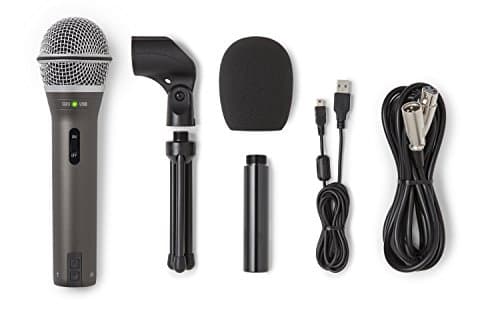
Samson
Q2U
Dynamic capsule rejects background noise better than any condenser at this price, USB and XLR outputs provide a future-proof upgrade path to an audio interface.
Rode NT-USB Mini — Best Audio Quality Under $100
The Rode NT-USB Mini delivers the best voice quality of any microphone under $100 on this list. The internal preamp is quieter than any competitor at this price, the noise floor is low enough that you can use it at higher gain settings without audible hiss, which matters in home offices where you might not be speaking loudly. The magnetic desk stand is sturdy and easy to reposition quickly. USB-C plug-and-play, no drivers.
What it lacks compared to the Blue Yeti is polar pattern flexibility, cardioid only. It has a headphone jack with zero-latency monitoring, which puts it ahead of the SoloCast for anyone who wants to hear themselves on calls. It's also more compact than the Blue Yeti, closer in desk footprint to the SoloCast.
For pure voice quality on a call, the NT-USB Mini is the pick in this price range. Rode has been building studio-grade microphones for decades, and the preamp quality in the Mini punches noticeably above its $99 price point. If the SoloCast is a practical upgrade and the Blue Yeti is a versatility upgrade, the NT-USB Mini is an audio quality upgrade.
Pros
- Lowest noise floor of any mic under $100 on this list, quietest internal preamp
- Zero-latency headphone monitoring jack with volume control
- Compact magnetic desk stand, sturdy and easy to adjust
- USB-C plug-and-play, works on Mac and Windows without drivers
- Rode build quality, designed and engineered for studio use
Cons
- Cardioid only, no polar pattern flexibility
- Magnetic stand, while convenient, offers less positioning range than a boom arm
- At $99, the Blue Yeti's multi-pattern flexibility is only $30 more
Best for: Home office workers who want the best pure call audio quality under $100 and don't need multi-pattern recording.
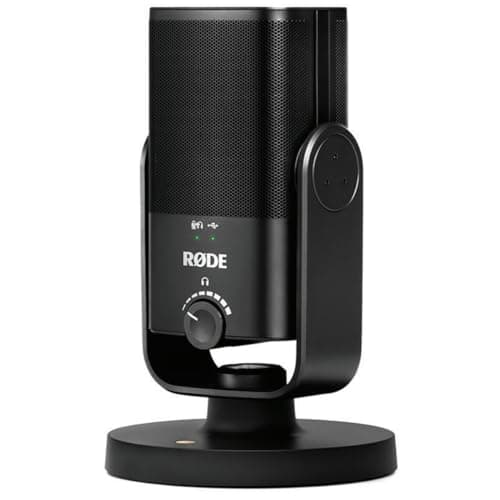
Rode
NT-USB Mini
Lowest noise floor of any USB mic under $100, studio-grade internal preamp, zero-latency headphone monitoring, compact magnetic desk stand included.
Condenser vs. Dynamic — Which Should You Choose for Your Home Office?
The right microphone type depends almost entirely on your room, not your budget. Condenser microphones capture voice detail beautifully but are sensitive to everything, including room echo, HVAC, and background conversation. Dynamic microphones are less detailed but require sound to be very close to the capsule to register clearly, which makes them naturally resistant to ambient noise.
If you have a quiet, dedicated home office: a condenser microphone (HyperX SoloCast, Rode NT-USB Mini, Blue Yeti, or Elgato Wave:3) is the right choice. Condensers capture the natural character of your voice, the warmth, the presence, the subtle resonance, better than any dynamic mic at the same price. In a controlled acoustic environment, that quality shows.
If you work in a noisy environment: dynamic is the answer. The Samson Q2U in a loud shared apartment will produce cleaner call audio than a Blue Yeti in the same room. The Q2U requires you to speak 2–4 inches from the capsule, which takes some positioning discipline, but the noise rejection is the trade-off.
If you're in an apartment with thin walls: go dynamic. Even intermittent noise, a neighbor's TV, hallway conversations, street noise on a bad day, will bleed into a condenser microphone on a call. Dynamic microphones reject those sources unless you're speaking directly into them.
If you want podcast/YouTube crossover: condenser with multi-pattern wins. The Blue Yeti's stereo mode for music interviews or the Elgato Wave:3's Clipguard for animated recording sessions justify the condenser choice. Dynamic microphones are typically the professional podcast standard, but at this price range and for USB convenience, the Blue Yeti is the more practical all-rounder.
Related: best noise-cancelling headphones for work
How Do You Set Up a USB Microphone for Best Results?
Getting the microphone right is 50% hardware and 50% placement and configuration. The hardware choice matters, but a well-positioned $49 SoloCast will outperform a poorly set-up $200 studio mic every time. These five adjustments improve every microphone on this list.
Positioning: 4–8 inches, slightly below chin
Position the microphone 4–8 inches from your mouth. This is closer than feels natural at first, but it's the distance where condenser microphones are designed to operate. The ideal angle is slightly below chin height, with the capsule aimed upward toward your mouth, this reduces plosive sounds (the burst of air from "p" and "b" sounds) without requiring a pop filter.
For dynamic microphones like the Samson Q2U, get even closer: 2–4 inches. The higher SPL handling of a dynamic capsule means you won't overload it at close range, and the proximity effect actually adds warmth to your voice.
Gain settings: start at 50–60%
Start gain at 50–60% in your operating system's input settings, then test with your video call platform's audio level meter. You want your voice peaks hitting around -12 dB to -6 dB, present and clear without pushing into clipping. If your voice sounds thin and distant, gain is too low; if it sounds harsh or distorted, it's too high.
Pop filter: optional but cheap
A pop filter ($8–$15) or a foam windscreen ($5–10) reduces the burst of air from plosive consonants that cause a low-frequency thump on recordings. For video calls it's optional; for podcast recording it's worth adding. Most USB microphones don't include one, the Blue Yeti and Rode NT-USB Mini users benefit most from this addition.
Room treatment: the free upgrade
Soft surfaces absorb echo. A rug on a hard floor, curtains on windows, and a bookshelf of books behind you reduce room reverb more than any microphone upgrade. If your room sounds like a bathroom, live, echoey, with a long decay, the microphone will capture that character regardless of quality. Treating the room is free and persistent.
Software settings: confirm the right input
Check your video conferencing app's audio settings and confirm it's using the USB microphone as the input, not the built-in laptop mic. Zoom, Teams, and Google Meet all allow per-app input selection. A surprising number of people plug in a USB mic and remain on the laptop mic because the app defaulted to the system device. This is the first thing to check if the improvement isn't immediate.
Related: home office lighting ideas, work from home productivity tips
Citation capsule: Audio quality directly affects perceived professionalism on video calls. A peer-reviewed PLOS ONE study of 167 participants found that background quality and image clarity significantly affected perceived competence and trustworthiness (PLOS ONE, 2023). While this study focused on visual elements, the same perceptual mechanism applies to audio, poor call audio degrades the impression of the speaker independent of what's being said, a pattern supported by research into audio-visual communication quality.
Which USB Microphone Should You Buy?
For most home office workers on regular video calls, the HyperX SoloCast is the answer. It fixes the laptop microphone problem completely for $49, cardioid polar pattern, tap-to-mute, plug-and-play, and a small enough footprint that it doesn't change your desk setup. The improvement to call quality is immediate and your colleagues will notice before you do.
If you're already recording content or doing weekly podcasts, step up to the Blue Yeti. The multi-pattern flexibility and voice quality at close range justify the $80 price difference.
If your home office is noisy, shared spaces, thin walls, unpredictable ambient sound, choose the Samson Q2U. Its dynamic capsule rejects background noise in a way no condenser mic at this price can match, and the dual USB/XLR output keeps future upgrade options open.
The Rode NT-USB Mini is the pick if voice quality matters above everything else and your room is controlled. At $99 it punches above its weight on internal preamp quality.
Whichever microphone you choose, audio is only half of how you come across on video calls. A quality webcam is the other half, our best webcams for home office guide covers the six best options across every price point, using the same criteria that matter for remote work: low-light performance, autofocus speed, and field of view control.