Count the plugs on your desk right now. Chances are you've got a monitor or two, a laptop charger, a desk lamp, speakers, a webcam, a phone charger, and maybe an external drive or USB hub. That's 6 to 10 devices — and most people are running all of them through a cheap power strip that cost less than a lunch.
The problem isn't outlet count alone. A bare power strip offers zero protection against power surges. One voltage spike from a storm or grid fluctuation can wipe out hundreds of dollars of gear instantly. The right desk power strip handles surge protection, USB charging, and cable routing all at once. Here are the five best options for 2026.
TL;DR: A modern home office desk runs an average of 6–10 powered devices simultaneously. The best desk power strips in 2026 combine 2,000–4,320 joules of surge protection with USB-C Power Delivery ports. The Belkin 12-Outlet (4,320J) is the top overall pick; the POWRUI 65W USB-C is the standout for laptop charging without a brick.
What Should You Look for in a Desk Power Strip?
According to UL (Underwriters Laboratories), consumers should verify UL listing as a baseline safety requirement before purchasing any surge protector (UL, 2024) — uncertified strips have no independently verified overvoltage protection. Beyond that safety floor, a few specs separate genuinely useful strips from filler.
Outlet count and layout. Six outlets is a minimum for a full desk setup. Twelve is comfortable. Look for widely spaced outlets or rotating heads, bulky transformer plugs block adjacent ports on standard strips.
Joule rating. This is the surge energy the strip can absorb before it fails. 1,000J is marginal for electronics. 2,000J handles typical office gear. 4,000J+ suits audio equipment and workstations. The catch: joule capacity is consumed as it absorbs surges. It doesn't refill.
USB-C Power Delivery. A 65W USB-C PD port can charge most thin-and-light laptops directly, eliminating a bulky brick from your outlet count entirely. For related charging strategies, see the USB hub guide and docking station roundup.
Cord length and flat plug. An 8-foot cord reaches floor outlets without extension cords. Flat plugs sit flush against the wall and route cables cleanly, standard angled plugs stick out several inches and make cable management harder. The cable management guide covers routing strategies that pair well with a wall-flush strip.
UL listing. Non-negotiable. UL 1449 is the specific standard for surge protective devices. If a strip doesn't carry it, skip it.
The 5 Best Power Strips for Desk in 2026
1. Belkin 12-Outlet Surge Protector — Best Overall
The Belkin 12-Outlet leads this list because it covers every common desk scenario without compromise. It delivers 4,320 joules of surge protection, the highest rating here by a wide margin, across 12 outlets with rotating and pivoting heads that accommodate wide transformer plugs. The 8-foot cord reaches floor outlets from most desk positions, and the CE/FCC certification gives it credibility beyond a bare UL listing.
This is the strip to buy if you're running dual monitors, a desktop, speakers, a desk lamp, and a full peripheral set. Nothing gets crowded.
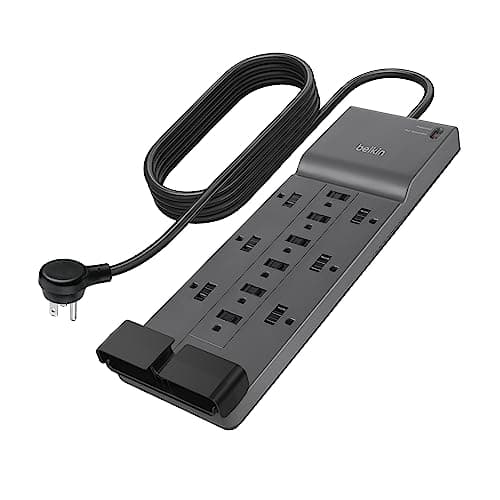
Belkin
Belkin 12-Outlet Surge Protector
Pros
- 4,320J surge rating, highest in this roundup
- 12 outlets with rotating heads for bulky plugs
- 8ft cord reaches floor outlets cleanly
- CE and FCC certified alongside UL listing
- Flat plug option for wall-flush routing
Cons
- No USB-C PD port, USB charging is USB-A only
- Larger footprint than compact strips
- Premium price compared to budget picks
2. Anker Power Strip with USB-C — Best for USB Charging
Anker's compact power strip is built for the desk that's already running a lot of USB devices. It combines 6–8 AC outlets with multiple USB-A ports and a USB-C PD port, all in a form factor that can sit on the desk surface rather than hiding behind it. If your desk is a mix of AC-powered gear and USB-charged devices (phone, earbuds, tablet), the Anker handles both without a separate charger block.
For desks that also need a dedicated data hub, pairing this with one of the options in the USB hub guide covers every power and data need.
Anker
Anker Power Strip with USB-C
Pros
- USB-C PD port reduces separate charger clutter
- Multiple USB-A ports handle phones and accessories
- Compact footprint, sits on desk without dominating
- Anker's well-established quality control
- Good outlet count for mid-size desks
Cons
- USB-C wattage varies by model, verify before buying
- Lower joule rating than Belkin
- Shorter cord on some versions
3. Tripp Lite Isobar 6-Outlet — Best for Sensitive Electronics
The Tripp Lite Isobar does something the others don't: line conditioning. Most surge protectors absorb voltage spikes but do nothing about electromagnetic interference (EMI) or radio frequency interference (RFI), the steady electrical noise that can introduce hum into audio gear, cause erratic behavior in studio equipment, or degrade signal quality on sensitive electronics. The Isobar filters both.
Its 1,400J surge rating is lower than the Belkin's, but noise filtration makes it the right call for audio production desks, home recording setups, or any workspace where interference affects output quality.
The audible hum difference on powered studio monitors is immediately noticeable when switching from a standard strip to the Isobar. For audio-sensitive setups, the line conditioning justifies the price premium.
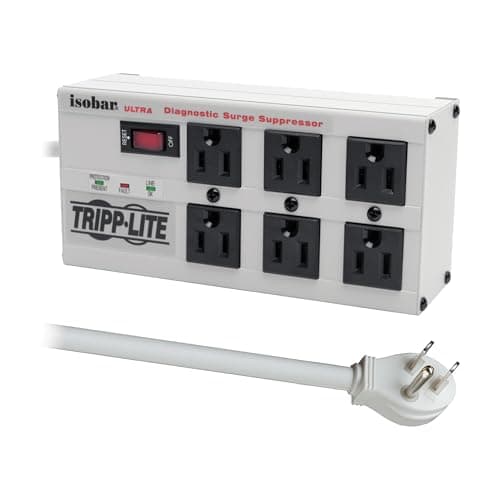
Tripp Lite
Tripp Lite Isobar 6-Outlet
Pros
- EMI/RFI noise filtration, not just surge suppression
- Ideal for audio equipment and sensitive studio gear
- UL listed with strong build quality
- Separate outlet banks isolate noisy devices
- Lifetime warranty on most Isobar models
Cons
- 1,400J surge rating is lower than top picks
- No USB charging ports
- More expensive per outlet than budget options
- Only 6 outlets, not enough for large setups
4. BESTEK 8-Outlet with USB — Best Value
At roughly $30, the BESTEK 8-Outlet gives you more hardware than almost anything at its price. Eight AC outlets, four USB-A ports, and 2,100 joules of surge protection, all in a single strip. That's a legitimate mid-tier joule rating, not a token number printed on a budget product.
For a home office setup under $500, this is the power strip pick. It doesn't have a USB-C PD port, which is the only real gap for modern desks. But if your laptop has its own charger and you mainly need USB-A for accessories, the BESTEK covers the rest without fuss.
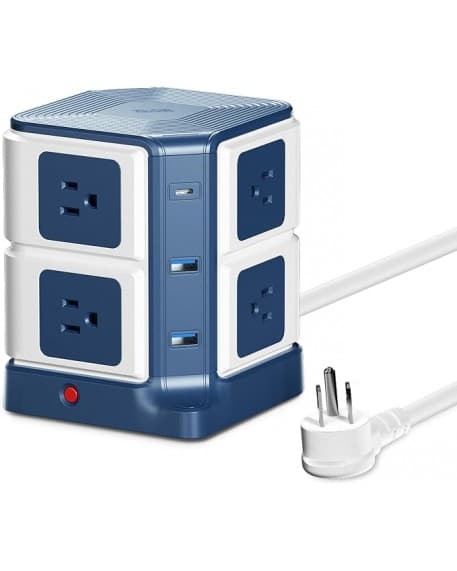
BESTEK
BESTEK 8-Outlet with USB
Pros
- 2,100J surge protection at ~$30
- 8 AC outlets plus 4 USB-A ports
- Strong value-per-outlet compared to premium picks
- Compact enough for most desk arrangements
- Wide availability
Cons
- No USB-C PD port
- USB-A only, no fast-charge on some models
- Build quality is functional, not premium
- Cord length shorter than Belkin
5. POWRUI USB-C 65W PD — Best for Laptop Charging
The POWRUI's singular advantage is its 65W USB-C Power Delivery port. That's enough to charge a MacBook Air, Dell XPS 13, or comparable thin-and-light laptop directly from the strip, no brick required. Remove the laptop charger from your outlet count and suddenly a 3-outlet strip feels much roomier.
It's a specialized pick. The outlet count is genuinely low, and it's not the right choice for a dense desktop setup. But for a laptop-centered home office where the laptop is the main device, reclaiming one outlet by eliminating the charger brick is a real quality-of-life improvement.
POWRUI
POWRUI USB-C 65W PD
Pros
- 65W USB-C PD charges most thin-and-light laptops directly
- Eliminates bulky laptop charger from your outlet count
- Compact form factor for minimal desk footprint
- USB-A ports included for accessories
Cons
- Only 3 AC outlets, not enough for full desktop setups
- Lower joule rating than Belkin or BESTEK
- Smaller brand, fewer long-term reviews
- Not suited for power users with many AC devices
Surge Protector vs. Power Strip — Does It Actually Matter?
A basic power strip and a surge protector look identical on a shelf, but they're fundamentally different products. According to UL, a power strip is simply a multi-outlet extension cord, it has no mechanism to protect against overvoltage (UL, 2024). A surge protector contains a metal oxide varistor (MOV) that diverts excess voltage to ground before it reaches your devices. For any desk running a laptop or monitor, the distinction matters.
A 1,000J rating handles minor fluctuations from everyday grid noise. A lightning strike nearby or a significant grid event can release far more energy in a single spike, which is why 2,000J is a reasonable floor for office electronics, and 4,000J+ makes sense for high-value equipment.
Most buying guides skip this: joule ratings degrade permanently with use. A two-year-old strip that's absorbed a few surges may be offering a fraction of its original protection. Replace every 2–3 years regardless, and immediately after any surge event you know occurred.
Citation capsule: UL distinguishes power strips from surge protective devices under separate safety standards. Surge protectors must meet UL 1449 certification, which requires independently verified overvoltage protection. A strip without UL 1449 listing offers no certified surge protection regardless of marketing language. (UL, 2024)
For workstations where downtime is expensive, pairing a surge protector with an uninterruptible power supply (UPS) closes the gap entirely, a UPS provides battery backup during outages and typically includes its own surge suppression.
How to Organize Cables Around Your Power Strip
A good power strip solves the outlet problem. Cable organization solves the visual chaos that follows. Where you mount or place the strip determines how cleanly the cables route.
Under-desk mounting. Most flat-plug strips include mounting slots or adhesive pads. Mounting the strip to the underside of the desk gets it off the floor, shortens cable runs to devices, and makes the desk surface look cleaner. Our full cable management guide covers the specific hardware that works best here.
Group by device type. Plug high-draw devices (monitors, desktop) on one side and low-draw devices (phone charger, lamp) on the other. It keeps cable lengths similar across the desk and avoids a bundle of short cables bunched at one end.
Use the flat plug advantage. Route the power cable along the baseboard rather than sticking straight out from the wall outlet. Combined with cable clips along the desk leg, this gets the main power cable completely out of sight. The ergonomic accessories guide and monitor arms roundup both address cable routing as part of the overall desk build.
Label your outlets. A small piece of masking tape on each cable, marked "monitor L," "monitor R," "speakers", saves real time when something stops working. It takes two minutes and eliminates the guessing game entirely.
Frequently Asked Questions
How many joules do I need in a surge protector for my desk?
For a standard home office desk running a monitor, laptop, and peripherals, aim for at least 2,000 joules. Basic strips at 1,000J are marginal for sensitive electronics. Audio and studio gear benefits from 4,000J or more, ideally combined with EMI/RFI line conditioning like the Tripp Lite Isobar provides.
Is a power strip the same as a surge protector?
No. A basic power strip adds outlets but offers zero surge protection. A surge protector contains an MOV that absorbs voltage spikes. For any desk with a laptop, monitor, or other electronics, always choose a UL 1449-certified surge protector, marketing language like "protection" on unlisted strips means nothing.
Can a 65W USB-C power strip charge my laptop?
Yes, for most thin-and-light laptops. The POWRUI 65W USB-C PD port handles MacBook Air, Dell XPS 13, and similar models. Gaming laptops typically need 100W or more and may charge slowly at 65W. Check your laptop's wattage requirement before assuming a USB-C strip covers it fully.
How often should I replace my surge protector?
Every 2–3 years is a common recommendation, or immediately after a major surge event. Joule capacity degrades permanently each time the strip absorbs a spike. A strip that's taken a big hit still passes power but may offer little remaining protection. When in doubt, replace it, surge protectors are cheap compared to the gear they protect.
The Bottom Line
A desk power strip isn't glamorous, but it's the piece that connects everything, and the one that fails silently when it's wrong. Here's what to take away:
- Start with joule rating. 2,000J minimum for electronics; 4,000J+ for audio gear or high-value workstations.
- UL 1449 certification is non-negotiable. No listing, no purchase.
- Match the strip to your device mix. USB-C PD matters if your laptop charger is eating an outlet. Line conditioning matters for audio equipment.
- Replace on a schedule. Joule capacity degrades. A two-year-old strip that's absorbed a few surges may be offering far less protection than its label claims.
The Belkin 12-Outlet is the safest overall pick for most home office desks. If USB-C laptop charging is the priority, the POWRUI 65W changes the outlet math considerably.
For the full desk setup picture, the home office setup under $500 guide walks through budgeting across all the core pieces, and the cable management guide covers what to do with all the cables once the strip is in place.